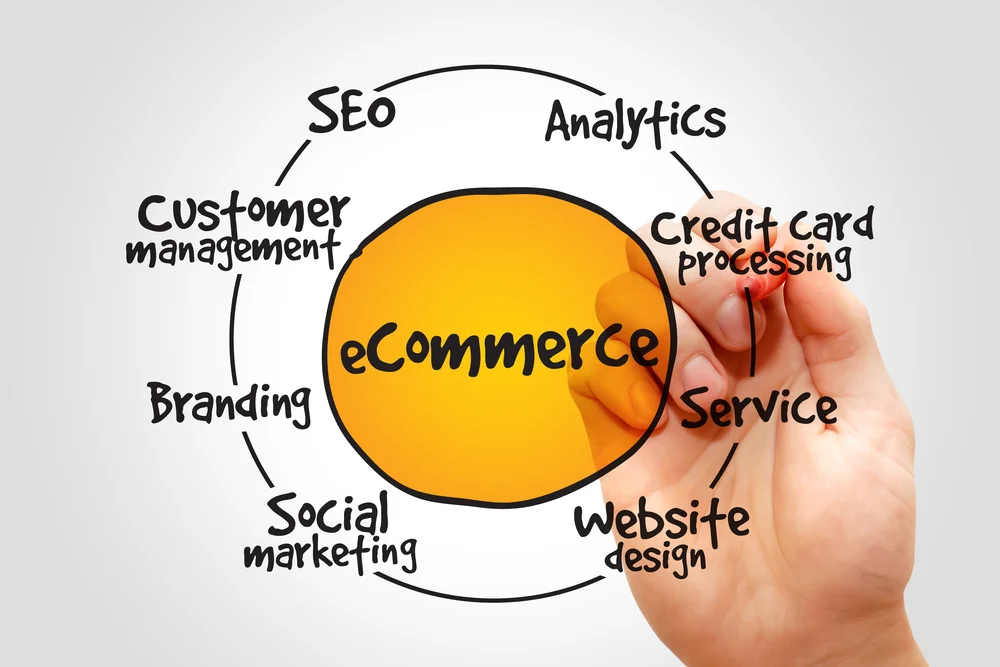

Artificial intelligence is changing how ecommerce brands plan, produce, edit, and scale visual content.
A campaign that once required a photographer, studio, models, stylists, equipment, product shipping, and several weeks of post-production can now begin with product references, a detailed creative brief, and an AI image generation platform.
This does not mean traditional photography is becoming unnecessary.
AI image generation for ecommerce works best when it supports a professional visual production process rather than attempting to replace product photography, creative direction, and quality control.
AI can help brands create lifestyle settings, seasonal campaigns, advertising concepts, social media assets, and background variations more efficiently. However, it can also change product details, distort materials, alter garment construction, misrepresent colours, and create unrealistic people or objects.
The difference between an attractive AI image and a commercially usable ecommerce image usually comes down to four factors:
- The quality of the original product reference
- The clarity of the creative direction
- The capabilities and limitations of the image generation platform
- The strength of the human review and editing process
This guide draws on practical image generation work across jewelry, maternity apparel, luxury handbags, and premium menswear. These categories are useful examples because they contain details that are especially difficult for AI to reproduce, including reflective metals, gemstones, garment fit, leather grain, logos, stitching, patterns, and human anatomy.
The goal of this guide is not to promote AI as a one-click replacement for commercial photography.
The goal is to explain how ecommerce brands can use AI responsibly, identify where it adds value, and build a workflow that protects product accuracy and customer trust.
Why Ecommerce Imagery Matters
Online customers cannot physically examine a product before purchasing it.
They cannot feel the weight of a handbag, inspect the prongs around a gemstone, test the stretch of a maternity dress, or examine the construction of a tailored jacket.
They depend on product imagery to understand:
| • Colour • Shape • Scale • Fit • Texture | • Materials • Construction • Features • Quality • Intended use |
Visuals also help customers imagine how a product might fit into their lives.
A white-background product image may show the basic shape of an item. A lifestyle image can communicate how that item looks when worn, where it might be used, and what kind of experience or identity is associated with it.
This is why many ecommerce brands need more than one image per product. For brands building a broader strategy around product presentation, advertising, conversion, and online growth, these visuals should also support the overall ecommerce marketing strategy.
A complete product presentation may include:
| • A primary product image • Front, side, and back views • Close-up detail images • Images showing scale • Images showing the product in use • Lifestyle photography | • Seasonal campaign imagery • Social media adaptations • Advertising graphics • Website banners • Email campaign assets |
Producing all these variations through traditional photography can require significant time and resources, particularly for brands with hundreds or thousands of products.
AI image generation can help expand an existing visual library. It can also help marketing teams explore concepts before committing to a full production.
However, it must be used carefully. An image that looks impressive at first glance may still contain inaccurate details that make it unsuitable for a product page.
Where AI Image Generation Adds Value
AI is most valuable when it is used for the right kind of visual task.
Some tasks require exact product documentation. Others are more conceptual and allow greater creative flexibility.
Understanding this distinction helps brands decide where AI belongs in the production process.
Faster Concept Development
Creative teams can use AI to visualize campaign ideas before scheduling a photoshoot.
For example, a team preparing a winter campaign could test several visual directions:
- A warm cabin interior
- A snowy city street
- A minimalist studio
- A luxury hotel
- A festive dining environment
- A neutral editorial background
Instead of discussing each concept only through written descriptions or mood boards, the team can create preliminary visuals and compare them.
These images may not become final campaign assets. Their value may come from helping the team choose the strongest setting, composition, lighting style, or colour palette.
This can reduce uncertainty before money is committed to models, locations, props, and production.
More Lifestyle Variations
A professionally photographed product can become the foundation for multiple AI-assisted scenes.
A handbag photographed in a studio might later appear in:
- A modern office
- An airport lounge
- A boutique hotel
- A luxury café
- An upscale shopping district
A maternity dress could appear in:
- A workplace
- A restaurant
- A park
- A baby shower
- A family gathering
- A neutral home environment
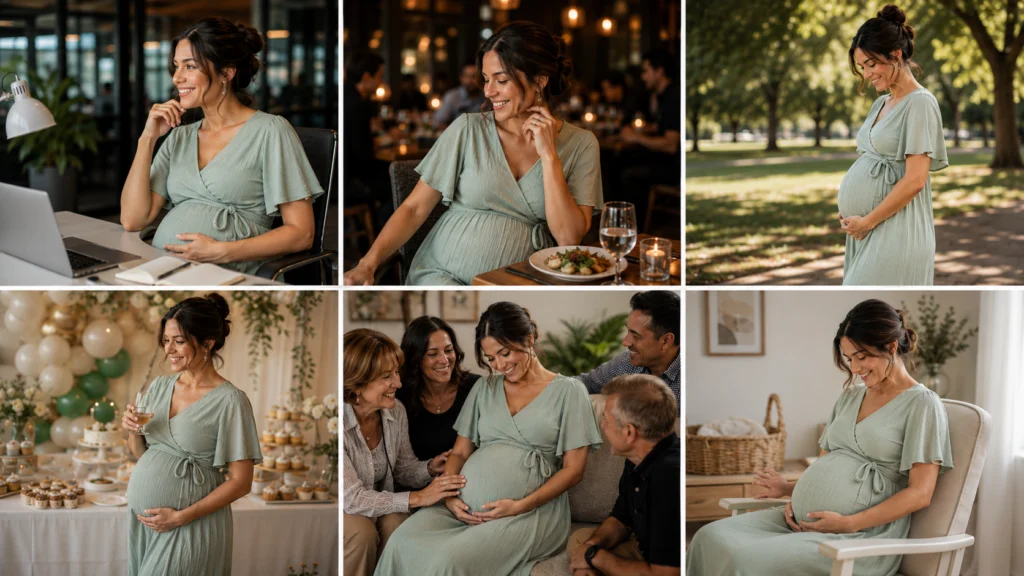
The product should remain faithful to the original reference. The setting, lighting, and surrounding story can change.
This is one of the most useful applications of AI image generation for ecommerce because it expands the visual story without requiring the brand to photograph every possible environment.
Seasonal Campaign Adaptation
Many ecommerce brands need new visuals for holidays, product launches, seasonal promotions, and regional campaigns.
AI can help transform a general product photograph into assets for:
| • Spring promotions • Summer travel campaigns • Autumn collections • Winter campaigns • Holiday gifting | • Seasonal campaign imagery • Valentine’s Day • Mother’s Day • Wedding season • Back-to-school campaigns |
The same product should not be represented inaccurately from one season to another. The environment and campaign styling can change, while product colour, construction, proportions, and key features remain consistent.
Content Resizing and Platform Adaptation
Marketing teams often need the same campaign adapted for multiple formats.
A single creative direction may require:
- A landscape website banner
- A square Instagram post
- A vertical Story or Reel cover
- A paid social advertisement
- An email header
- A marketplace image
- A mobile website graphic
AI-assisted editing and expansion can help adjust compositions for different aspect ratios. For Shopify brands, these variations can also support product pages, landing pages, campaigns, and other assets developed as part of a broader Shopify marketing strategy.
This works especially well when the product remains unchanged and additional background space is needed around it.
The final files still require review. Extending an image can introduce repeated patterns, distorted objects, inconsistent lighting, or inaccurate details around the product.
Creative Testing
AI allows brands to create multiple visual variations for testing.
A team might compare:
- Product-only images against lifestyle images
- Neutral backgrounds against colourful backgrounds
- Close-up compositions against wider scenes
- Model imagery against product flat lays
- Editorial lighting against bright commercial lighting
These variations can be tested in advertisements, emails, landing pages, or social media campaigns.
The purpose is not to assume that AI-generated images will automatically perform better. Performance should be measured through actual customer behaviour.
Useful indicators may include:
- Click-through rate
- Add-to-cart rate
- Conversion rate
- Time on page
- Product-page engagement
- Return rate
- Customer feedback
Where AI Still Falls Short
AI image generation has improved, but it remains inconsistent in areas where exact physical details matter.
A model may generate an image that appears realistic from a distance while producing errors that become obvious when the image is enlarged.
Product Accuracy
The most important question is not whether the image looks attractive.
The most important question is whether it represents the product honestly.
AI may change:
| • Product proportions • Colour • Shape • Materials • Stitching • Hardware • Logos | • Buttons • Fasteners • Gemstone settings • Fabric construction • Pattern placement • Functional features |
These changes can create a gap between what customers see and what they receive. Product accuracy is also important when preparing ecommerce catalogs and assets for platforms such as Google Merchant Center, where businesses need consistent product information and imagery. Our Google Merchant Center setup service helps businesses establish and manage that foundation.
For decorative campaign content, a small background inconsistency may not matter. For a primary product image, even a small product inconsistency may be unacceptable.
Human Anatomy
People remain challenging for image generation platforms.
Common problems include:
| • Unnatural hands • Awkward joints • Distorted arms • Inconsistent facial features • Asymmetrical eyes | • Uncomfortable poses • Unrealistic posture • Clothing merging into the body • Accessories appearing attached incorrectly |
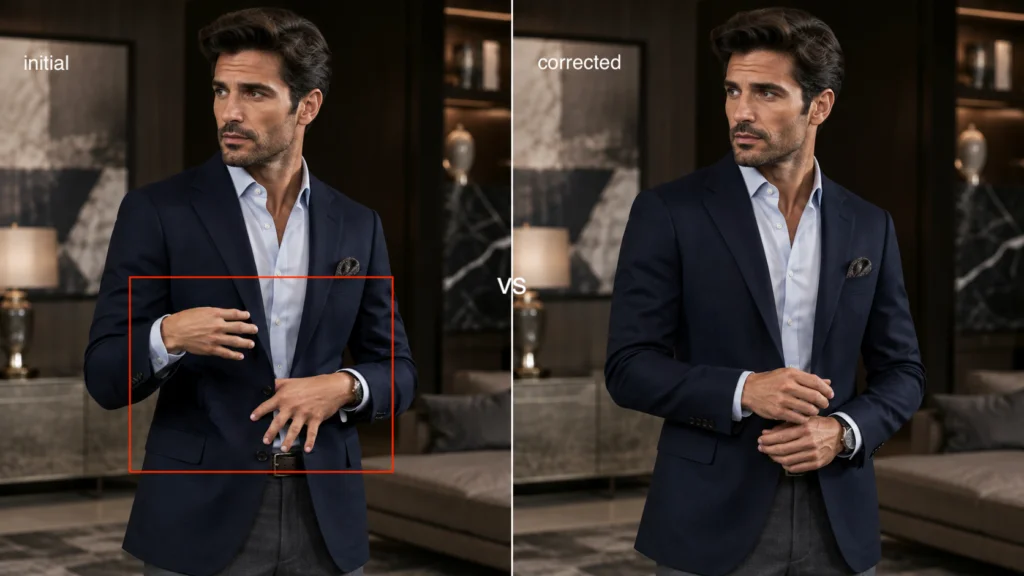
These problems are especially important in fashion, jewelry, maternity, beauty, and lifestyle photography.
A customer may not consciously identify every anatomical problem, but unnatural details can make an image feel artificial or untrustworthy.
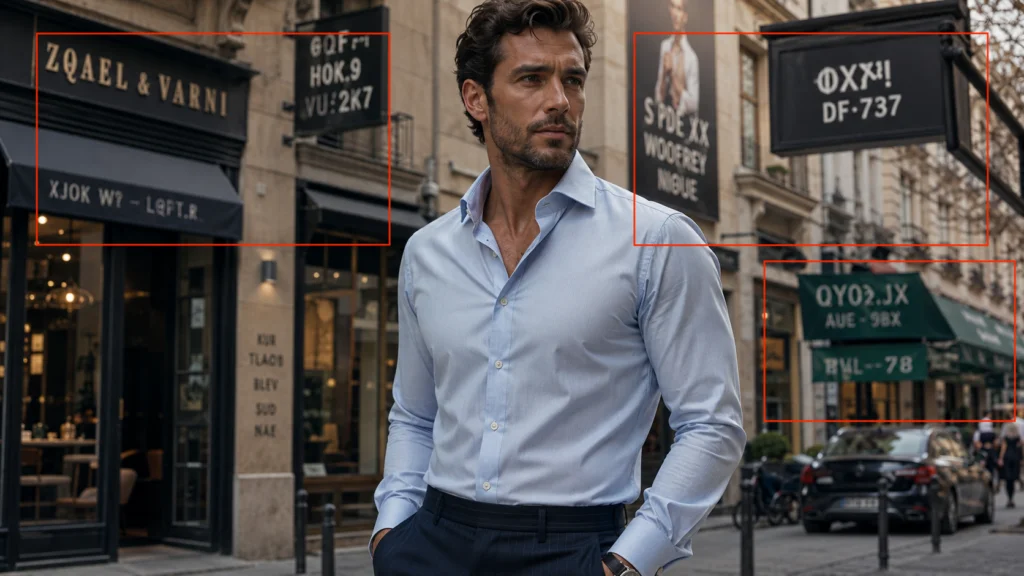
Text and Logos
AI-generated text remains unreliable.
Logos, labels, packaging text, signs, and embroidered brand names may become:
- Misspelled
- Distorted
- Repeated
- Incomplete
- Misaligned
- Replaced with invented symbols
Brands should not assume that a generated logo is accurate simply because it looks convincing at first glance.
In many commercial workflows, it is safer to generate the visual without relying on AI-rendered text and then add approved typography or logos during post-production.
Material Behaviour
Different materials respond to light and movement in different ways.
AI may struggle to accurately represent:
| • Polished metal • Transparent gemstones • Full-grain leather • Suede • Silk • Chiffon | • Lace • Structured wool • Knitwear • Reflective hardware • Transparent glass • Glossy packaging |
A material may appear too plastic, too smooth, too reflective, too heavy, or too thin.
These inaccuracies can change how customers understand the quality and construction of a product.
Consistency Across Multiple Images
Generating one attractive image is often easier than generating a complete, consistent campaign.
Across several generations, AI may change:
| • The model’s appearance • The product size • The camera angle • The lighting direction • The colour temperature | • The background architecture • The product hardware • The garment length • The logo placement |
Brands that need consistency must build a structured system rather than relying on isolated prompts.
Comparing AI Image Generation Across Product Categories
Different products create different challenges. The table below summarizes where AI tends to be most useful and where human review is most important.
| Product category | Primary AI challenge | Strongest AI use | Details requiring close review |
| Fine jewelry | Reflections, gemstones, symmetry, and very small construction details | Lifestyle backgrounds, campaign concepts, and environmental compositions | Stone cuts, prongs, clasps, chain connections, metal finish, scale, and engraving |
| Maternity apparel | Body proportions, garment fit, fabric tension, and authentic posture | Lifestyle storytelling, seasonal campaigns, workwear scenes, and social media imagery | Bump shape, waist placement, garment length, fabric drape, sleeves, seams, and overall fit |
| Luxury handbags | Structured shape, leather texture, stitching, hardware, and logos | Aspirational environments, travel scenes, office settings, and editorial campaigns | Leather grain, stitching, edge paint, zippers, clasps, hardware colour, logos, and proportions |
| Premium menswear | Tailoring, garment structure, layering, and pattern alignment | Editorial campaigns, professional settings, seasonal styling, and brand imagery | Lapels, collars, cuffs, buttons, pockets, seams, sleeve length, fabric texture, and pattern continuity |
This comparison shows why a single AI image generation process cannot be applied to every product in the same way.
The more a product depends on exact craftsmanship, fit, structure, or branding, the more important the reference images and quality-control process become.
AI Image Generation for Fine Jewelry
Jewelry is one of the most demanding categories for AI image generation.
Customers often inspect jewelry at a level of detail that is uncommon in many other product categories. They may zoom in to examine the gemstone cut, number of prongs, metal finish, chain construction, clasp, engraving, and relationship between the centre stone and surrounding stones.
An image can look luxurious while still representing an impossible piece of jewelry.
Why Jewelry Is Difficult
Jewelry combines several visual challenges:
| • Highly reflective surfaces • Transparent and refractive stones • Precise symmetry • Small structural components • Fine engravings | • Multiple points of light • Complex shadows • Exact proportions • Close interaction with hands, ears, necks, and wrists |
Traditional jewelry photographers carefully control lighting because a small adjustment can change how metal and gemstones appear.
AI does not necessarily reproduce these optical effects through precise physical simulation. It attempts to generate a visually plausible result based on the model, references, and instructions it receives.
This can lead to images that look realistic without being structurally or physically accurate.
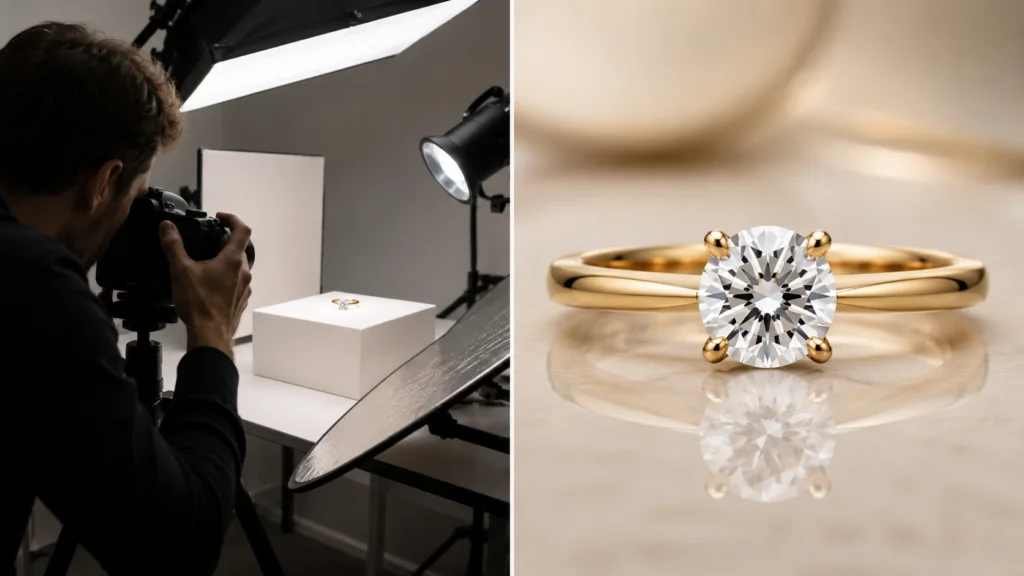
Common Jewelry Errors
Inaccurate Gemstone Cuts
AI may confuse round brilliant, oval, emerald, princess, pear, cushion, and marquise cuts.
It can also generate hybrid shapes that do not match the actual product.
Facets may appear uneven or inconsistent. The centre stone may change shape between generations.
Incorrect Settings
A ring that should have four prongs may appear with five or six.
Prongs may disappear, merge into the stone, or fail to make contact with it. A bezel setting may become a prong setting. Pavé stones may appear randomly distributed.
Floating Gemstones
Gemstones may appear to hover above a setting rather than being securely held.
This is one of the clearest signs that an image should not be used commercially without correction.
Unrealistic Metal
Gold may appear like yellow plastic. White gold may lose its reflective finish. Platinum may appear flat. Rose gold may shift toward copper or pink.
The metal can also change between different areas of the same piece.
Scale Problems
Earrings may become too large for the wearer’s ears. Rings may appear oversized on the hand. A pendant may sit at an unrealistic scale compared with the necklace chain.
Best Use of AI for Jewelry
The most reliable workflow begins with clear photography of the real item.
AI can then support the creation of:
| • Lifestyle backgrounds • Wedding scenes • Restaurant settings • Holiday campaigns | • Editorial lighting concepts • Social media images • Website banners • Gift-focused campaigns |
The environment can be imaginative. The jewelry should remain accurate.
For example, a real ring can be placed into a romantic dinner setting or wedding campaign while preserving the centre stone, setting, band, and proportions from the original reference.
Jewelry Prompt Requirements
Jewelry prompts should identify:
| • Jewelry type • Gemstone type • Gemstone cut • Metal • Setting • Number of prongs, when important | • Band style • Camera distance • Lighting • Wearing position • Intended mood • Background |
A general request such as “a luxury diamond ring on a woman” gives the model too much freedom.
A more controlled prompt could be:
Close-up commercial jewelry photograph of a woman wearing the referenced solitaire engagement ring. Preserve the exact round centre stone, four-prong setting, polished white-metal band, stone proportions, and ring scale from the reference image. Use soft diffused studio lighting, realistic skin texture, a natural hand position, shallow depth of field, and a neutral luxury background.
Even a detailed prompt does not guarantee perfect product preservation. It provides clearer direction and reduces some ambiguity.
Jewelry Quality-Control Questions
Before approving the image, ask:
| • Does the stone match the real cut? • Is the setting correct? • Are all prongs present? • Are the stones physically attached? • Is the band shape accurate? • Does the metal match the original? | • Is the scale believable? • Are reflections consistent? • Are the wearer’s hands natural? • Are logos or engravings accurate? • Has any product detail been invented? |
For fine jewelry, close review is not optional. Small inaccuracies can have a large effect on trust.
AI Image Generation for Maternity Apparel
Maternity apparel presents a different challenge.
The image must accurately represent the garment while portraying pregnancy in a comfortable, authentic, and respectful way.
Customers may be evaluating more than colour and style. They may also want to understand:
- How the garment fits around the bump
- Whether the fabric appears comfortable
- Where the waistline sits
- How the item may fit during different trimesters
- Whether it can be worn after pregnancy
- How long the dress or top appears
- Whether the garment looks appropriate for work or events
Why Maternity Apparel Is Difficult
AI models may rely on generalized patterns when depicting pregnancy. This can produce exaggerated or anatomically inconsistent results.
Common issues include:
| • Unnatural bump shapes • Incorrect posture • Distorted waistlines • Hands merging into the stomach • Clothing clipping through the body | • Excessive fabric tension • Uneven hemlines • Sleeves changing length • Unrealistic body proportions • Garment details disappearing around the bump |
A generated model may look pregnant, but the garment may no longer match the product being sold.
Fit Must Remain Accurate
Maternity clothing is designed to accommodate changing body proportions.
Some garments use:
- Stretch panels
- Empire waists
- Side ruching
- Wrap construction
- Adjustable ties
- Elastic waistbands
- Nursing access
- Flexible knit fabrics
AI may misunderstand these functional details.
A dress with subtle side ruching may become heavily gathered. An empire waist may be placed too low. A relaxed top may become tight around the bump. A garment designed for nursing may lose the feature entirely.
The reference image should be treated as the source of truth.
Authentic Representation
Maternity imagery should feel warm, natural, and respectful rather than overly staged.
Helpful creative directions may include:
- Natural expressions
- Relaxed standing or seated poses
- Comfortable hand placement
- Realistic fabric movement
- Everyday environments
- Soft, believable lighting
- A range of personal styles
- Different stages of pregnancy across the campaign
Diversity should be considered across the full visual campaign.
A single model cannot represent every age, ethnicity, skin tone, body type, family structure, and style. Rather than adding a vague instruction such as “diverse representation,” brands should intentionally plan a broader set of images featuring different people and experiences.
Strong Uses of AI for Maternity Brands
AI can be effective for:
| • Workwear environments • Seasonal wardrobe campaigns • Restaurant and event settings • Outdoor lifestyle imagery • Neutral home interiors | • Baby shower concepts • Travel imagery • Social media content • Editorial banners • Trimester wardrobe guides |
A studio image of a real maternity dress can be used as the basis for a lifestyle version showing how the item might appear in a workplace or special-event setting.
The garment must still be checked carefully after generation.
Maternity Apparel Prompt Requirements
A strong prompt may include:
| • Pregnancy stage • Garment type • Garment colour • Fabric • Length • Fit • Waist placement | • Sleeve style • Model pose • Hand placement • Lighting • Environment • Mood • Required product details |
For example:
Professional maternity fashion image featuring a woman in her third trimester wearing the referenced beige knit midi dress. Preserve the exact neckline, sleeve length, fabric texture, hemline, relaxed fit, and waist construction shown in the product reference. Use a natural standing pose, comfortable hand placement, soft window lighting, a modern neutral office, realistic fabric drape, and an authentic expression.
Maternity Quality-Control Questions
Review:
| • Is the bump shape natural? • Does the posture look comfortable? • Does the garment fit as intended? • Is the waist in the correct position? • Has the garment become tighter or looser? | • Are the sleeves and hem accurate? • Does the fabric behave naturally? • Are hands and fingers realistic? • Are patterns and seams preserved? • Does the image respectfully represent the model? |
For maternity brands, authenticity should take priority over dramatic styling.
AI Image Generation for Luxury Handbags
Luxury handbags are highly dependent on craftsmanship and brand recognition.
Customers may inspect:
| • Leather grain • Stitching • Edge paint • Handles • Hardware • Zippers | • Clasps • Lining • Logos • Shape • Structure • Proportions |
An AI-generated handbag may look expensive from a distance while containing construction details that would never exist on the real item.
Why Handbags Challenge AI
A structured handbag requires consistency across many connected parts.
The left and right handles should match. Stitching should follow the seams. Hardware should have the same finish. Zippers should connect logically. The bag should maintain its intended silhouette.
AI may generate each detail independently rather than preserving the product as one exact object.
Common Handbag Errors
Inconsistent Stitching
Stitches may change direction, disappear, overlap, or vary in size.
On a luxury product, these details are important indicators of craftsmanship.
Distorted Hardware
Clasps, buckles, rings, and zipper pulls may become asymmetrical or physically impossible.
Gold hardware can shift to silver. Reflective surfaces can look melted or warped.
Unrealistic Leather
Leather may appear overly smooth, overly textured, plastic, or inconsistent from one section of the bag to another.
The material may also change between images in the same campaign.
Altered Shape
A structured tote may become soft. A rounded bag may develop sharp corners. Handles may change length. The base may become uneven.
Incorrect Logos
AI may misspell the brand, move the logo, invent a symbol, or change the size of an embossed mark.
For commercial use, approved logos should often be added or corrected during post-production.
Best Use of AI for Handbag Imagery
A real product photograph should remain the central reference.
AI can help place the bag in:
- Hotel lobbies
- Office environments
- Airport lounges
- Boutique cafés
- Luxury vehicles
- Travel settings
- Shopping districts
- Minimalist homes
- Editorial studios
This is especially useful for resale boutiques or retailers that have strong product photographs but limited lifestyle content.
Handbag Prompt Requirements
Specify:
| • Bag type • Exact shape • Colour • Leather type • Hardware finish • Handle style • Closure type | • Stitching • Logo requirements • Camera angle • Product position • Lighting • Environment • Mood |
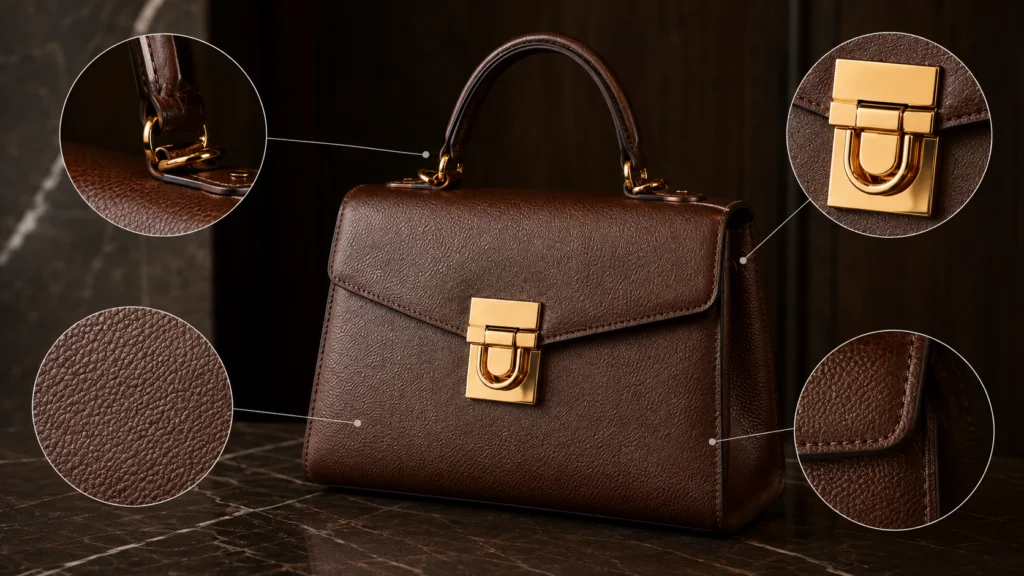
For example:
Editorial commercial photograph featuring the referenced structured black leather handbag. Preserve the exact silhouette, handle length, gold hardware, zipper placement, stitching, edge paint, proportions, and logo position from the source image. Place it on a marble table in a modern hotel suite with soft window lighting, realistic leather grain, shallow depth of field, and minimal background distractions.
Handbag Quality-Control Questions
Ask:
| • Does the silhouette match? • Are the handles symmetrical? • Is the hardware finish consistent? • Are the zippers functional and correctly placed? • Does the stitching follow the real seams? | • Is the leather texture believable? • Is the logo accurate? • Has the bag changed size? • Are folds physically possible? • Does the product remain consistent with other images? |
The background can support aspiration. It should not distract from or alter the product.
AI Image Generation for Premium Menswear
Premium menswear may appear simpler than jewelry or handbags, but tailoring depends on precision.
Customers often notice:
| • Shoulder structure • Lapel shape • Collar construction • Sleeve length • Cuff details • Button placement | • Pocket alignment • Trouser break • Fabric texture • Pattern continuity • Garment drape |
A small construction error can make a premium garment appear inexpensive or poorly fitted.
Common Menswear Errors
AI may create:
| • Uneven lapels • Twisted collars • Asymmetrical shoulders • Floating buttons • Misaligned pockets • Incorrect cuffs | • Changing sleeve lengths • Distorted hems • Impractical folds • Shirts merging into jackets • Accessories attached incorrectly |
These errors are particularly visible in formalwear, suits, dress shirts, and structured jackets.
Pattern Alignment
Patterns require close attention.
Plaids, checks, pinstripes, and repeating prints should continue logically across seams and garment panels.
AI may cause:
- Stripes to change direction
- Plaid lines to break
- Checks to change size
- Patterns to stretch around the body
- Repeated motifs to disappear
- Fabric designs to change between sleeves
Solid-colour garments are generally more forgiving, but they still require accurate fit, fabric texture, and construction.
Layering Complexity
Menswear campaigns often combine several items:
- Shirts
- Jackets
- Overcoats
- Knitwear
- Scarves
- Ties
- Pocket squares
- Watches
- Eyewear
Each additional item creates another opportunity for distortion.
When product accuracy is important, it is often better to focus the generation on one primary garment and keep the rest of the styling simple.
Strong Uses of AI for Menswear
AI can help create:
- Office environments
- Wedding settings
- Seasonal campaigns
- Luxury hotel scenes
- Editorial interiors
- City lifestyle imagery
- Travel campaigns
- Social media assets
- Website banners
- Professional portraits
The styling should support the product rather than overwhelm it.
Menswear Prompt Requirements
Include:
| • Garment type • Fabric • Colour • Pattern • Fit • Collar or lapel style • Cuff style • Button count | • Pocket placement • Layering • Model pose • Lighting • Camera angle • Environment • Brand mood |
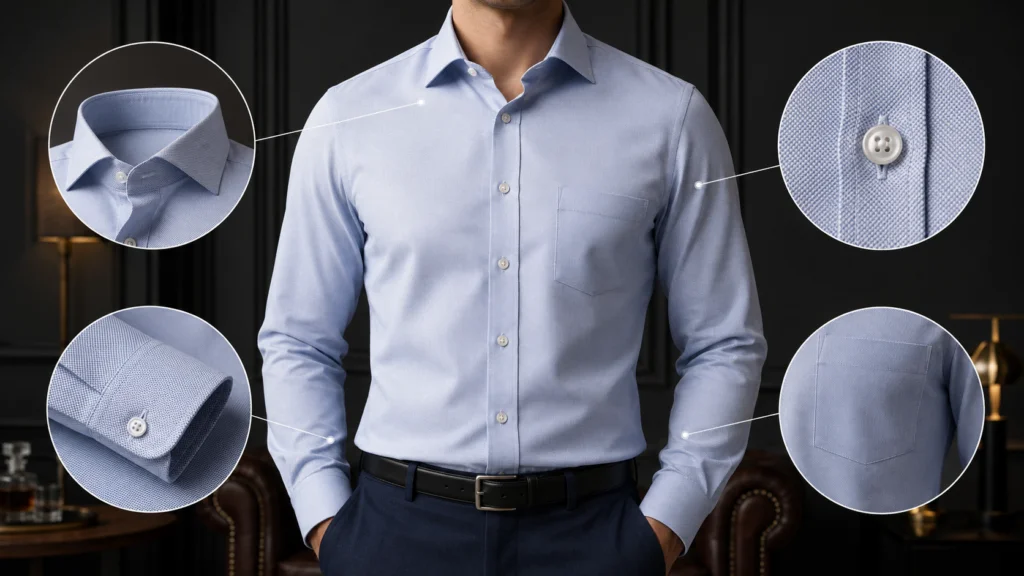
For example:
Premium menswear editorial featuring a model wearing the referenced navy wool blazer. Preserve the exact notch lapels, two-button closure, pocket placement, shoulder structure, sleeve length, fabric texture, and tailored fit shown in the reference. Use a natural standing pose, soft directional lighting, a refined office interior, understated styling, and realistic garment drape.
Menswear Quality-Control Questions
Review:
| • Are the shoulders symmetrical? • Are the lapels and collar correctly shaped? • Are buttons and pockets in the right locations? • Is the sleeve length accurate? • Does the garment fit naturally? | • Are patterns aligned across seams? • Does the fabric match the real material? • Are layers physically separate? • Are accessories attached correctly? • Does the product remain the focal point? |
A Practical AI Image Generation Workflow
Commercial-quality results rarely come from one perfect prompt.
A professional workflow is iterative. It combines planning, references, generation, review, editing, and testing.
Step 1: Define the Objective
Before generating an image, decide what the visual needs to accomplish.
Ask:
- Which product is being featured?
- Where will the image appear?
- Who is the intended audience?
- Is the image for a product page or a campaign?
- Is product accuracy the main goal?
- Is the image intended to tell a story?
- What action should the viewer take?
- What emotion should the visual communicate?
A primary Shopify product image requires a different level of accuracy than an inspirational social media post.
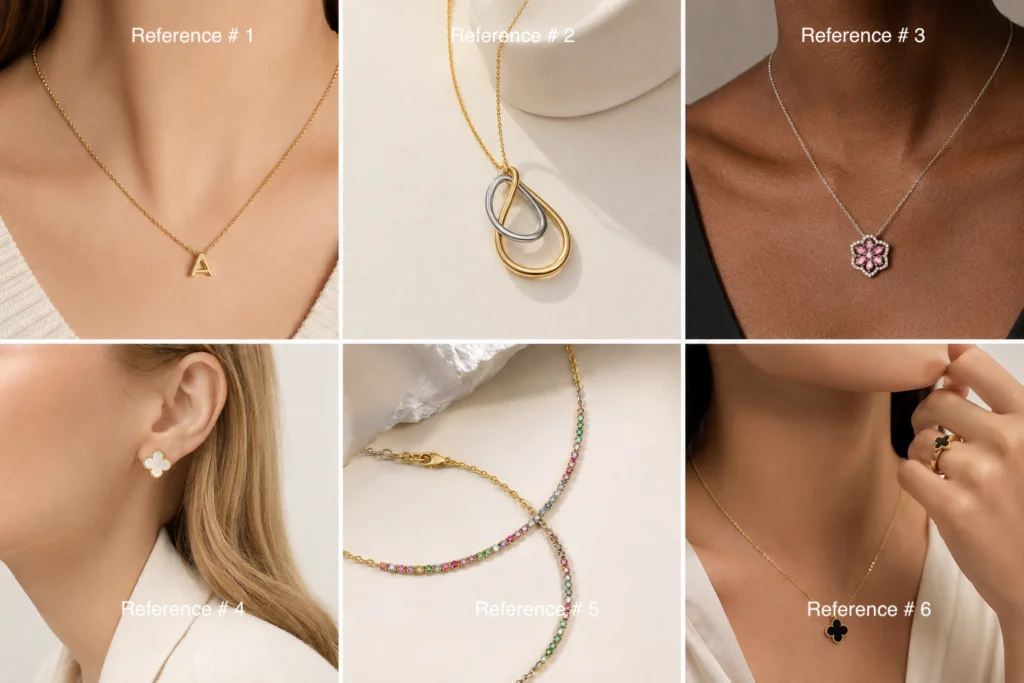
Step 2: Gather Product References
Strong references reduce the amount of information the model must invent.
Useful references may include:
| • Front, side, back views • Close-up details • Product dimensions • Colour references • Material descriptions • Logos | • Hardware • Labels • Garment construction • Images showing scale • Images showing the product when worn |
When possible, use clear, high-resolution references with consistent lighting.
A single compressed image may not provide enough information to preserve small product details.
Step 3: Build the Creative Brief
The creative brief should define the visual system before prompts are written.
Include:
| • Campaign goal • Intended platform • Target audience • Brand personality • Background style • Lighting direction • Colour palette | • Camera perspective • Image ratio • Model direction • Styling rules • Product details that cannot change • Elements that may be creatively adjusted |
This brief helps prevent each image from moving in a different direction.
Step 4: Write a Structured Prompt
A strong ecommerce prompt usually includes several layers.
Subject
What is the primary product or person?
Product Details
What physical characteristics must remain accurate?
Materials
What is the item made from?
Composition
Where is the product placed in the frame?
Camera Direction
Is the image close-up, full-length, eye-level, overhead, wide, or editorial?
Lighting
Is the lighting soft, directional, bright, natural, high-key, or cinematic?
Environment
Where does the image take place?
Mood
Should it feel warm, modern, luxurious, playful, minimal, professional, or relaxed?
Constraints
Which details must not change?
A practical prompt framework could be:
Create a [type of image] featuring the referenced [product]. Preserve the exact [important product details] from the source image. Show the product in [composition and position] using [lighting] in [environment]. The overall mood should feel [brand mood]. Maintain realistic [materials, anatomy, fit, reflections, or construction]. Do not alter [protected product features].
Step 5: Generate Controlled Variations
Do not change every creative variable at once.
Create a small set of controlled variations by adjusting one area at a time:
- Background
- Camera distance
- Model pose
- Lighting
- Composition
- Seasonal styling
This makes it easier to understand which instruction improved or weakened the result.
Step 6: Evaluate the Full Image
Begin with the overall impression.
Ask:
- Is the product easy to identify?
- Is the composition appropriate?
- Does the image match the brand?
- Is the setting believable?
- Is the product the focal point?
- Does the image communicate the intended message?
An image may be visually attractive but still fail its marketing objective.
Step 7: Inspect Product Details
Zoom in and compare the generation with the source.
Review:
| • Colour • Shape • Scale • Materials • Construction • Hardware | • Logos • Fasteners • Patterns • Stitching • Labels • Functional features |
Do not depend on memory. Compare the image directly with the product reference.
Step 8: Inspect People and Environments
When people appear, review:
| • Fingers • Eyes • Teeth • Arms • Posture | • Clothing interaction • Facial consistency • Accessories • Shadows • Reflections |
Also inspect the background for:
- Repeated objects
- Impossible architecture
- Distorted furniture
- Inconsistent lighting
- Unreadable signs
- Invented text
- Items merging together
Step 9: Decide How to Correct the Image
Not every issue can be solved by making the prompt longer.
Depending on the problem, the next step may involve:
| • Prompt refinement • A new generation • A stronger reference image • Regional editing • Inpainting • Background replacement | • Product compositing • Manual retouching • Logo replacement • Colour correction • Cropping |
General composition issues may improve through revised prompting.
Exact product details, logos, fingers, stitching, and hardware may require targeted editing or manual post-production.
Step 10: Export for the Intended Platform
Prepare the final image according to the platform.
Check:
- Aspect ratio
- Resolution
- File size
- Mobile appearance
- Product visibility
- Safe space for text
- Cropping
- Compression
- Colour consistency
A horizontal website banner may need more negative space. A square paid social image may require a closer crop. A vertical Story may require the product to be placed away from interface elements.
Step 11: Test Performance
AI-generated content should be tested rather than assumed to be effective.
Compare it with existing creative using relevant metrics.
For ecommerce campaigns, including Google Shopping advertising, creative performance should be evaluated alongside metrics such as:
- Click-through rate
- Cost per click
- Conversion rate
- Cost per acquisition
For a product page, measure:
- Add-to-cart rate
- Conversion rate
- Time on page
- Image interactions
- Return rate
For social media, consider:
- Reach
- Saves
- Shares
- Comments
- Profile visits
- Website clicks
The goal is not to prove that AI is better than traditional photography. The goal is to identify which visual approach works best for the audience and purpose.
Building Brand Consistency
AI makes it easy to generate variety. It does not automatically create consistency.
A campaign can quickly become disconnected if every image uses a different model, lighting style, colour treatment, composition, and background.
Brands should create an internal AI visual guide.
This may include:
| • Approved prompt templates • Brand colour palette • Preferred lighting • Model guidance • Camera angles • Background rules | • Product placement • Retouching standards • Logo rules • Aspect ratios • File naming • Approval responsibilities |
Prompt libraries can be organized by use case:
- Studio images
- Lifestyle images
- Seasonal campaigns
- Product launches
- Email graphics
- Paid social advertisements
- Website banners
- Editorial content
Documenting successful prompts reduces unnecessary experimentation and helps different team members produce more consistent work.
Ethical and Legal Considerations
AI-generated imagery can affect customer expectations, brand reputation, and legal risk.
The safest guiding principle is simple:
AI should help communicate the product, not misrepresent it.
Honest Product Representation
Generated images should not make a product appear to have features it does not possess.
Brands should verify:
- Dimensions
- Colour
- Materials
- Shape
- Construction
- Functional details
- Included accessories
- Fit
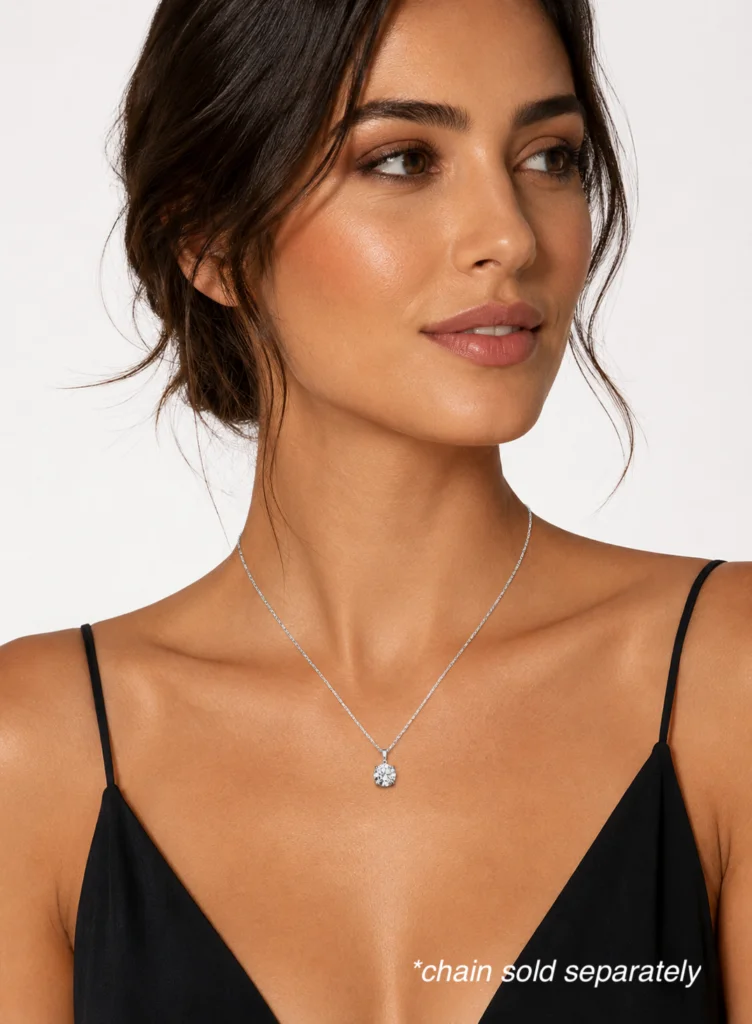
An aspirational setting is different from an inaccurate product.
A handbag can be placed in a luxury hotel, but its shape and hardware should remain correct. A maternity dress can be shown at a formal event, but its fit and length should not be changed. A ring can appear in a wedding setting, but the stone and setting should match the item being sold.
Intellectual Property
Companies should avoid using AI to imitate protected artwork, packaging, designs, or recognizable branded assets without authorization.
They should also review the commercial-use terms of the AI platform they use.
Requirements can vary by jurisdiction, platform, product category, input material, and intended use. Brands should establish internal policies and seek appropriate legal guidance when necessary.
Transparency
Whether AI involvement should be disclosed can depend on the context, market, platform, and degree of alteration.
At minimum, internal teams should know:
- Which images were AI-generated or AI-assisted
- Which product references were used
- What edits were made
- Who reviewed the final image
- Where the image was published
Maintaining a production record can support consistency, accountability, and future revisions.
Inclusive Representation
AI can help brands develop broader visual campaigns, but inclusion should be intentional.
Campaign planning can consider:
- Age
- Skin tone
- Body type
- Mobility
- Personal style
- Family structure
- Cultural setting
Generated people should still be represented naturally and respectfully. Diversity should not be treated as a vague prompt addition or a visual checklist applied to one image.
Ecommerce AI Image Quality Assurance Checklist
Before publishing an AI-generated or AI-assisted image, complete a structured review.
Product
- Does the product match the real item?
- Is the colour accurate?
- Is the scale believable?
- Is the shape correct?
- Are materials represented realistically?
- Are all product features present?
- Has anything been added or removed?
- Does the item remain consistent with other images?
Construction
- Is stitching accurate?
- Are seams aligned?
- Are buttons and pockets correctly placed?
- Are zippers, clasps, or closures functional?
- Is hardware symmetrical?
- Are gemstone settings correct?
- Are patterns continuous?
- Is the garment construction preserved?
People
- Are the hands natural?
- Is the number of fingers correct?
- Are the eyes aligned?
- Is the facial expression believable?
- Is the posture comfortable?
- Are body proportions realistic?
- Does clothing interact naturally with the body?
- Are accessories attached correctly?
Materials
- Does metal reflect light naturally?
- Does leather have realistic grain?
- Does fabric drape correctly?
- Are transparent materials believable?
- Do shadows match the material?
- Is texture consistent across the product?
Branding
- Is the logo correct?
- Is typography readable?
- Are brand colours accurate?
- Does the image match the visual identity?
- Is the style consistent with the rest of the campaign?
- Have invented words or symbols been removed?
Composition
- Is the product the focal point?
- Is the camera angle appropriate?
- Is the perspective believable?
- Is the lighting consistent?
- Are shadows realistic?
- Does the background support the product?
- Is there sufficient space for website or advertising text?
- Will the composition work on mobile?
Commercial Readiness
- Is the image suitable for its intended purpose?
- Could it mislead a customer?
- Has it been compared with the source product?
- Has another person reviewed it?
- Is the resolution sufficient?
- Is the file correctly formatted?
- Has the image been tested in its final placement?
Final Thoughts
AI image generation for ecommerce has moved beyond simple experimentation.
It can help brands develop concepts, expand visual libraries, create lifestyle scenes, adapt campaigns, test creative directions, and produce content for multiple channels.
Its value, however, depends on how it is used.
The strongest workflows do not ask AI to invent every product detail. They begin with accurate references, define clear creative objectives, protect the features that matter, and include careful human review.
Traditional photography provides authenticity and product truth. AI provides speed, flexibility, and creative scale. Designers, photographers, marketers, merchandisers, and ecommerce teams provide judgment.
When these elements work together, brands can produce more content without sacrificing the accuracy, craftsmanship, and trust that customers expect.
The future of ecommerce imagery is not simply artificial.
It is collaborative.
Frequently Asked Questions
AI should not currently be treated as a complete replacement for accurate product photography.
Real photography remains especially important when customers need to evaluate exact colour, construction, size, fit, materials, and product features.
AI is often most useful for expanding existing photography into new backgrounds, lifestyle environments, marketing campaigns, and platform formats.
They can be used only when the image accurately represents the real product and complies with the requirements of the selling platform.
For products with detailed construction, luxury materials, logos, precise fit, or regulated claims, real product photography is usually the safer primary reference.
AI-assisted images may be more appropriate as secondary lifestyle images unless the product can be preserved accurately.
Many categories can benefit, particularly when AI is used for backgrounds, settings, concepts, or creative variations.
Potential applications include:
Fashion
Jewelry
Furniture
Home goods
Beauty
Accessories
Consumer electronics
Food packaging
Lifestyle products
The appropriate workflow depends on how much product precision the category requires.
Yes, but only with strong references, careful creative direction, and rigorous quality control.
Luxury customers often pay close attention to materials, craftsmanship, logos, stitching, hardware, fit, and construction. AI-generated luxury imagery should be inspected at full resolution before publication.
Prompt structure is important because it helps define the product, composition, environment, lighting, mood, and protected details.
However, a detailed prompt cannot guarantee complete product accuracy. Strong reference images, editing tools, and human review are equally important.
One of the biggest mistakes is treating AI as a one-click solution.
Brands may publish an image because it looks attractive without checking whether the product, anatomy, materials, background, or branding are accurate.
A structured review process is necessary for commercial use.
Disclosure requirements may depend on the market, platform, context, and degree of alteration.
Even when public disclosure is not required, brands should document AI use internally and ensure the image does not mislead customers.
Consistency can be improved through:
Standardized references
Reusable prompts
Approved visual guidelines
Consistent camera direction
Controlled lighting
Reference-based generation
Editing and compositing
Documented quality checks
Perfect consistency may still require manual retouching.
Yes.
AI imagery should be evaluated using real campaign and ecommerce performance rather than assumptions.
Brands can compare customer engagement, conversion behaviour, return rates, and feedback to determine where AI-assisted content adds value.