ChatGPT Business Hub allows eligible businesses to claim and manage their business profiles within ChatGPT. Through the platform, companies can update important business information, access aggregated discovery insights, and explore additional features designed to support customer interactions.
Introduced by OpenAI in November 2026, Businesses in ChatGPT provides organizations with a way to manage certain details about their products, services, and operations. However, claiming a profile does not guarantee more recommendations, higher visibility, or additional sales.
Setting up a business profile involves checking eligibility, finding or creating a listing, verifying ownership, and completing the required business information. Depending on the business type and location, additional verification or features may also be available.
In this guide, we will walk through how to add your business to ChatGPT step by step, explain what you can manage through Business Hub, and examine how the platform fits into a broader SEO and generative engine optimization (GEO) strategy.
What Is Businesses in ChatGPT?
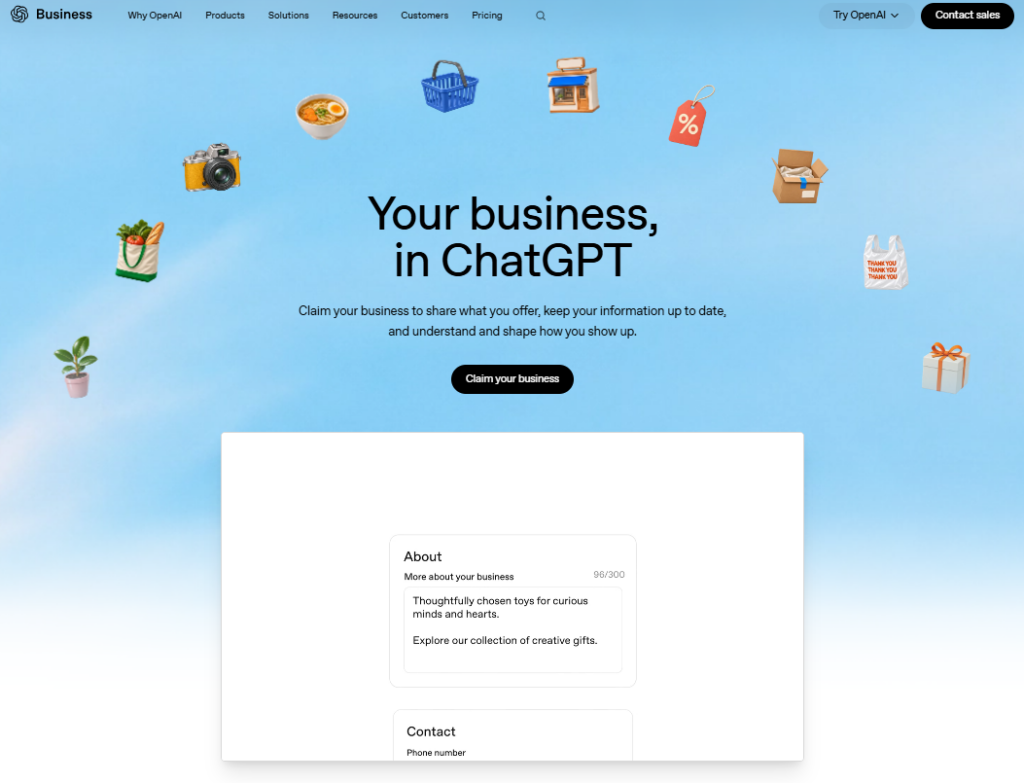
Businesses in ChatGPT is a new OpenAI initiative designed to help companies manage information about their businesses within ChatGPT.
The feature introduces Business Hub, where eligible organizations can claim their business profiles, provide updated details, and access insights into how users discover and interact with their businesses.
According to OpenAI’s official announcement, the beta launch also introduces Business Agents, which allow certain eligible companies to offer conversational experiences where customers can ask questions about products and services.
However, these capabilities have different eligibility requirements.
Business profiles are available to eligible organizations in supported locations, while Business Agents are initially limited to qualifying ecommerce and online service businesses in the United States.
It’s also important to distinguish Business Hub from ChatGPT Business.
ChatGPT Business is a workspace subscription designed for teams using ChatGPT in their operations. Business Hub, on the other hand, is where eligible organizations manage their public-facing business information and related features.
You don’t need a ChatGPT Business subscription or an advertising account simply to claim an eligible business.
For companies exploring AI search, this development introduces a new way to provide accurate information directly to a platform where potential customers may already be researching their options.
Why Should Businesses Claim Their ChatGPT Profile?
Think about how customers research businesses today.
Someone looking for a marketing agency might ask ChatGPT to compare service providers, explain their specialties, or suggest companies that match a particular need.
An online shopper might ask about product availability, shipping policies, or differences between competing products.
In these situations, accurate business information matters.
Claiming your ChatGPT business profile gives your organization a way to manage certain details that may help users better understand what you offer.
Once your claim and required verification are approved, you can provide information such as your business description, website, category, logo, and applicable policies.
Eligible retailers can also connect product feeds containing information such as prices and availability.
Another important feature is access to aggregated insights.
Business Hub can show how often your business is mentioned, how frequently users click through to your website, and which general discovery topics are associated with those interactions.
These insights can help you identify opportunities to improve your business information and better understand how your company appears in AI-powered discovery experiences.
However, there’s an important distinction.
Claiming your business doesn’t guarantee that ChatGPT will recommend it more frequently, improve its placement, or generate additional sales.
ChatGPT continues to make independent recommendations and comparisons. Business Hub provides a way to manage information and understand certain interactions, not a direct ranking control.
For businesses developing a GEO strategy, that makes Business Hub a useful addition to their digital presence rather than a replacement for SEO, content quality, or broader AI search optimization.
How to Add Your Business to ChatGPT: Step-by-Step
Ready to get your business listed in ChatGPT? The process starts in Business Hub, where you can search for your company, provide its information, and complete the required verification.
The exact steps may vary depending on your business type, location, and available verification methods. Here’s what the setup process looks like when creating a new business profile through a website.
Step 1: Search for Your Business in ChatGPT
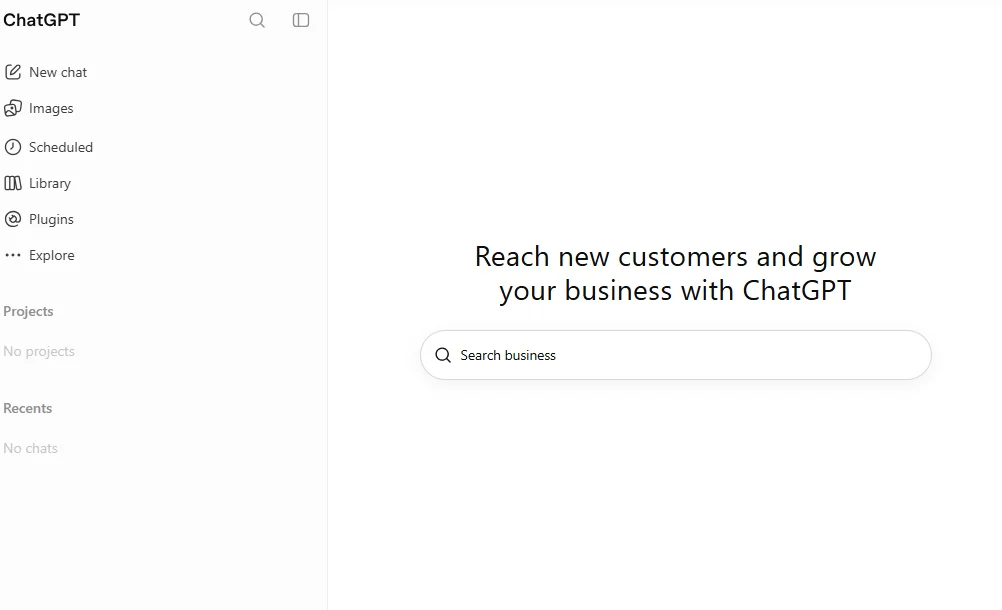
Start by opening ChatGPT Business Hub and signing in to your account.
You’ll see a search bar where you can enter your business name. Search for your company to check whether a profile already exists.
If you find a matching listing, select it to begin the claiming process. If your business isn’t listed, you may be able to create a new profile, depending on eligibility.
Step 2: Start Adding Your Business
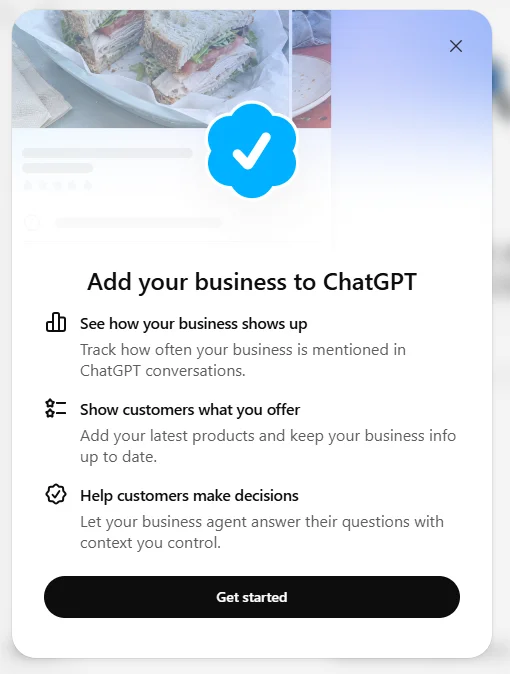
Once you’ve selected the option to add your business, ChatGPT will introduce the features available through Business Hub.
These include tracking how your business is mentioned, keeping business information updated, and exploring additional customer interaction features where eligible.
Click Get started to continue with your business profile setup.
Step 3: Choose How Customers Interact With Your Business
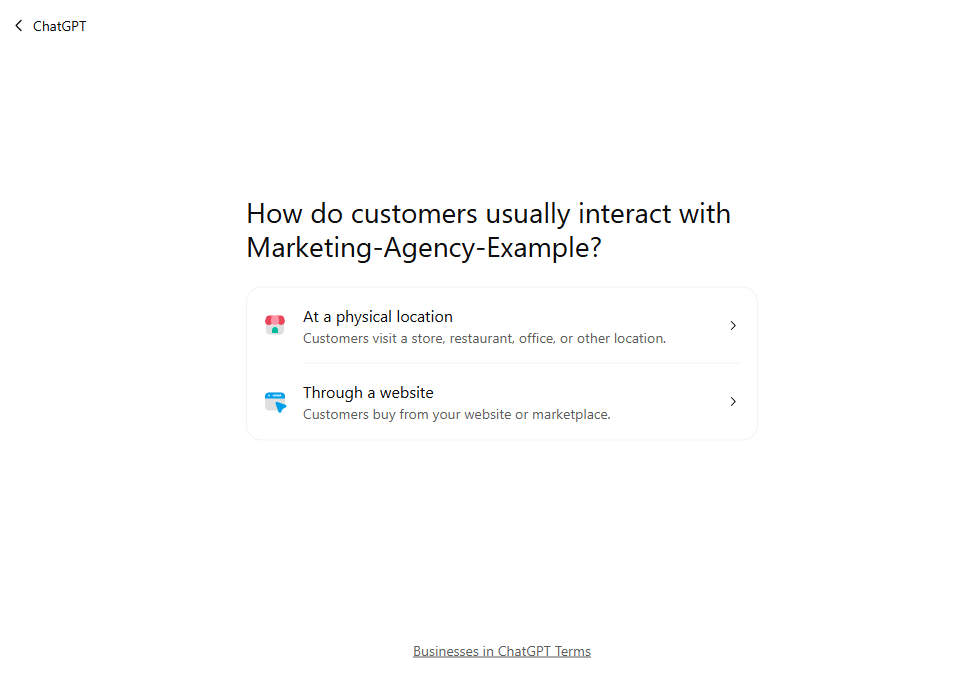
Next, ChatGPT will ask how customers usually interact with your company.
You’ll see two options:
- At a physical location: For businesses where customers visit a store, restaurant, office, or another location.
- Through a website: For businesses that primarily serve customers through a website or online marketplace.
Choose the option that best describes your business.
For this example, we’ll follow the website-based setup process.
Step 4: Verify Your Business Website
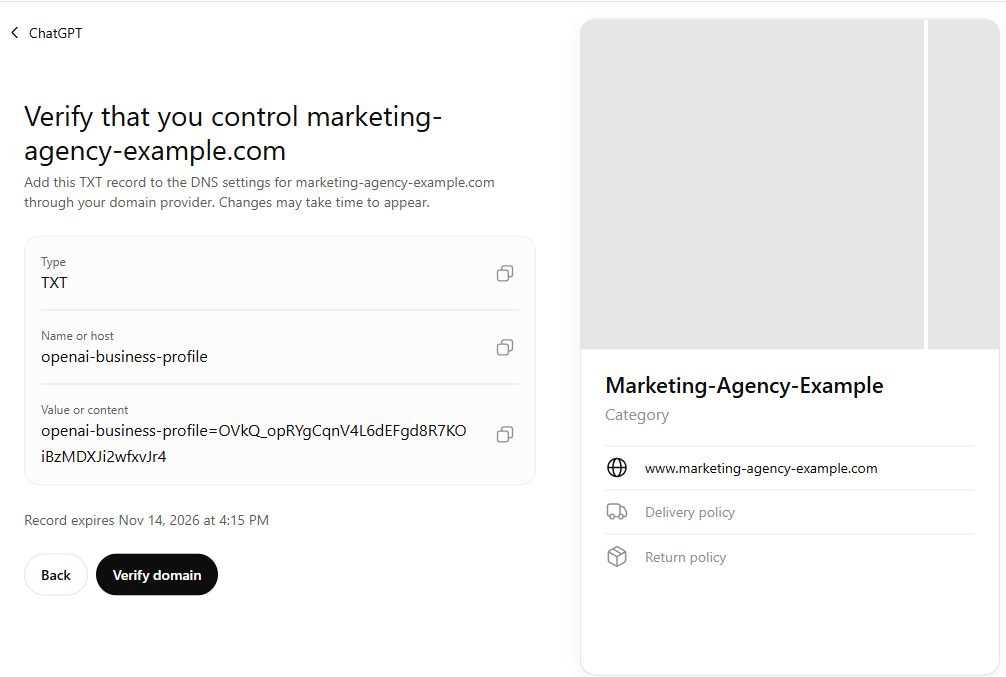
If you’re setting up a website-based business, ChatGPT may ask you to verify that you control the associated domain.
One available method involves adding a TXT record to your website’s DNS settings.
ChatGPT will provide the information you need, including the record type, host name, and verification value.
Copy these details into your domain provider’s DNS settings, then return to ChatGPT and click Verify domain.
Keep in mind that DNS changes may take some time to become detectable. The verification record may also have an expiration date, so check the information displayed on your screen.
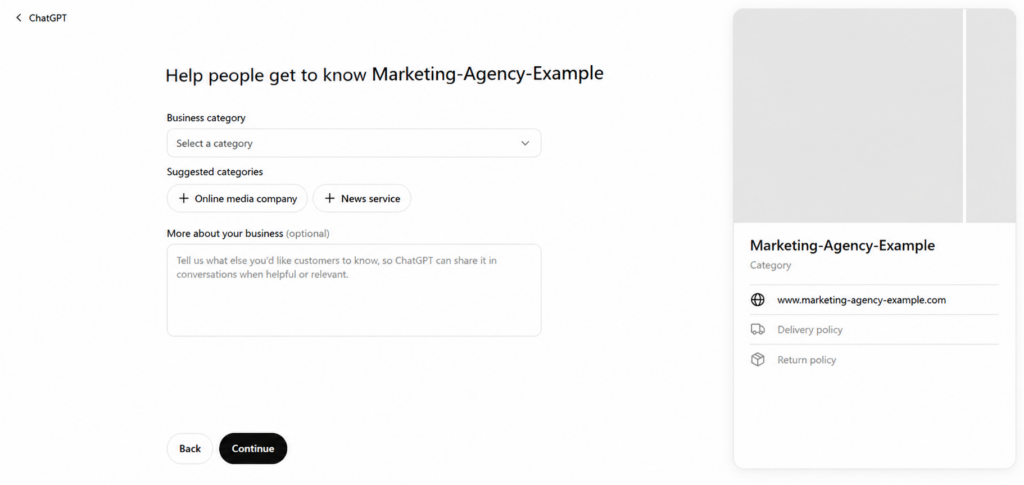
Step 5: Select Your Business Category and Add a Description
Once you’ve completed the domain verification stage, ChatGPT will ask for more information about your business.
Start by selecting the category that best represents your company.
You may see suggested categories or use the dropdown menu to find a more appropriate option.
You’ll also have the opportunity to add an optional business description.
Use this space to explain what your company offers and what makes its products or services relevant to potential customers.
For example, a digital marketing agency could describe its SEO, paid advertising, and content marketing services, along with the types of businesses it supports.
Keep your description informative and accurate rather than filling it with promotional claims or repeated keywords.
When you’re ready, click Continue.
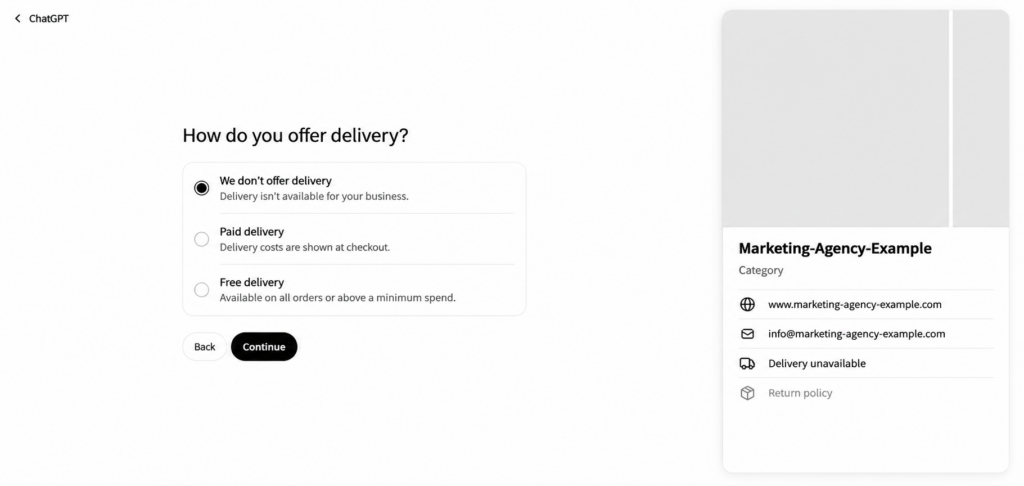
Step 6: Specify Your Delivery Options
ChatGPT will then ask how your business handles delivery.
Depending on your operations, you can choose whether you offer no delivery, paid delivery, or free delivery.
If your company provides digital services rather than physical products, you can select We don’t offer delivery when that accurately reflects your business.
The information you select will appear in the business profile preview.
Click Continue to proceed.
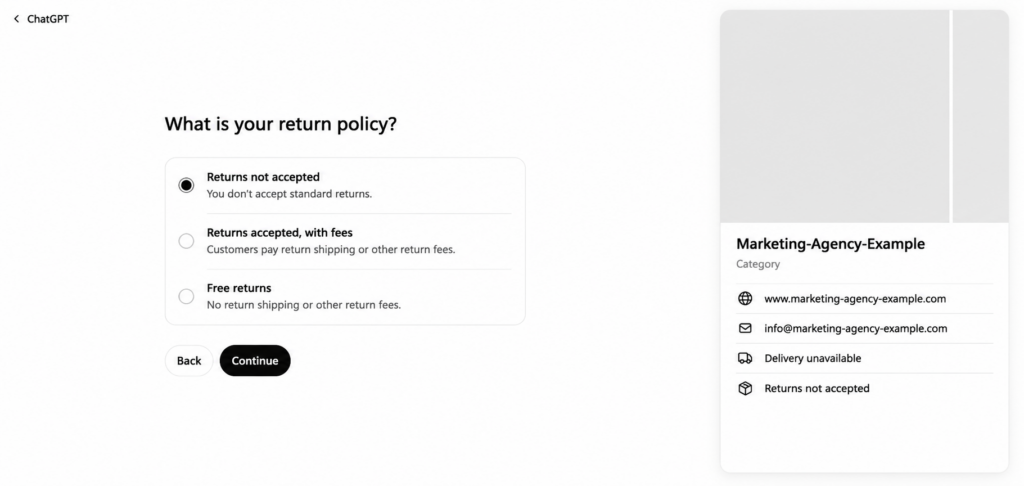
Step 7: Add Your Return Policy
Next, you’ll be asked about your return policy.
The available options include:
- Returns not accepted: Your business doesn’t accept standard returns.
- Returns accepted, with fees: Customers may need to pay return shipping or other applicable fees.
- Free returns: Customers can return eligible purchases without return shipping or related fees.
Choose the option that accurately reflects your company’s policies.
For service-based businesses, some of these fields may be less relevant than they are for retailers. Select the most accurate available option and make sure your website clearly explains any applicable cancellation or refund conditions.
Click Continue to finish entering your business details.
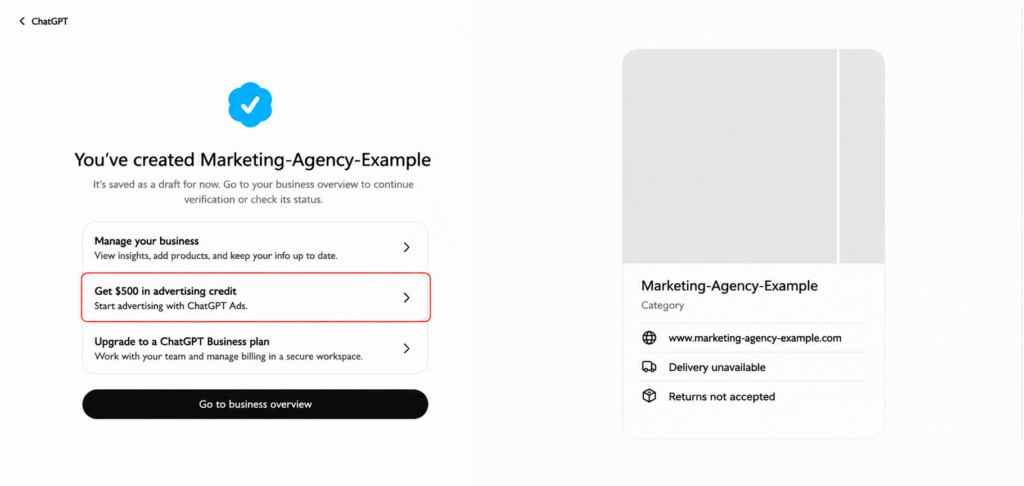
Step 8: Review Your Created Business Profile
After completing the setup fields, ChatGPT will display a confirmation that your business profile has been created.
However, your profile is initially saved as a draft.
This means you’ve completed the information-entry process, but additional verification may still be required before your business can access all eligible features.
From this screen, select Go to business overview to review your profile and continue the verification process.
You may also see options related to ChatGPT advertising or ChatGPT Business subscriptions. These are separate offerings and aren’t required simply to create a business profile.
Step 9: Complete Verification and Check Your Business Status
In your business overview, you’ll be able to review your profile and check the status of your verification.
ChatGPT may require additional identity verification, including a government-issued ID, before you can publish business information or access certain features.
Follow the verification instructions displayed in Business Hub and provide any required documentation through the designated verification process.
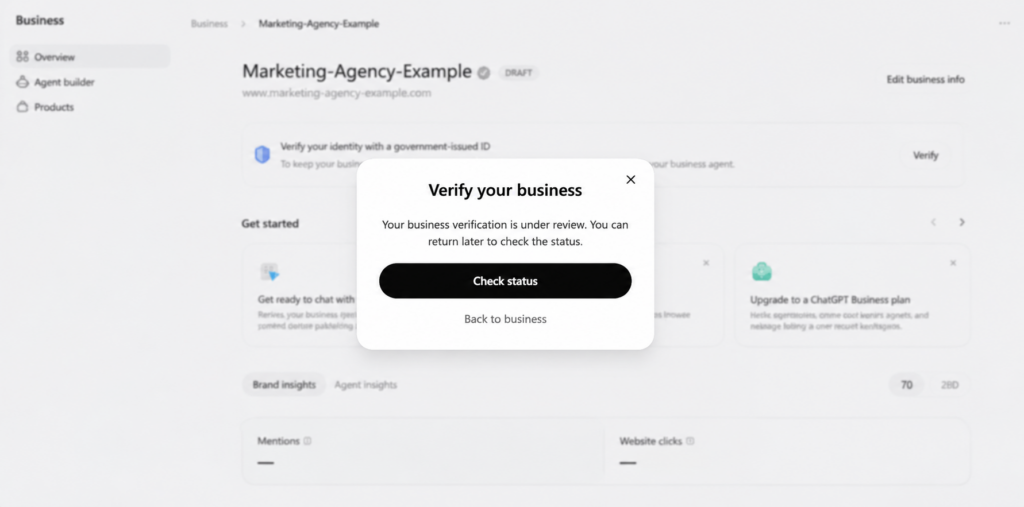
Once your information has been submitted, you may see a message indicating that your business verification is under review.
You can return to Business Hub later and select Check status to see whether the review has been completed.
Remember that creating a draft profile, verifying your domain, and receiving final business approval are different stages.
Once the necessary verification is approved, you’ll be able to manage the business information and features available to your organization.
What Can You Manage Through ChatGPT Business Hub?
Once your business has completed the required verification, Business Hub provides a central place to manage information about your company within ChatGPT. This can include your business description, category, website, logo, policies, and other supported profile details.
Keeping this information accurate is important as your business evolves. If you introduce a new service, update your policies, or change your product offerings, review the corresponding information in Business Hub to ensure it reflects your current operations.
Eligible retailers can also connect product feeds containing details such as product descriptions, pricing, and availability. These feeds provide additional information that ChatGPT may use when responding to relevant shopping questions, although connecting a feed does not guarantee that particular products will be recommended.
Business Hub also provides access to aggregated insights that can help eligible businesses understand certain discovery interactions within ChatGPT.
Understanding Business Hub Insights
Business Hub Insights provides information about how users discover and interact with businesses through ChatGPT. According to OpenAI, available metrics can include:
- Business mentions: How often your company is mentioned in ChatGPT.
- Website clicks: How frequently users click through to your website.
- Discovery topics: Common themes associated with conversations in which your website is cited.
These metrics can help businesses identify which services, products, or topics are associated with their presence in AI-powered discovery experiences. For example, frequent mentions related to a particular service may indicate an opportunity to review the corresponding website content and business information.
Insights are aggregated to protect user privacy and are only available when sufficient activity meets the platform’s reporting thresholds. Businesses do not receive access to individual user conversations.
Use these metrics alongside website analytics, search performance, and other marketing data rather than treating them as a complete measure of AI search visibility.
What Are ChatGPT Business Agents?
Business Agents are conversational experiences that allow eligible companies to provide information about their products and services directly within ChatGPT. They give customers an additional way to ask business-specific questions, explore available offerings, and obtain information before making a purchasing decision.
Businesses can configure their agents using information about their products, services, policies, and communication guidelines. For example, an ecommerce retailer may use a Business Agent to help customers compare product configurations, understand available options, or review purchasing policies.
Business Agents operate separately from ChatGPT’s independent recommendations. When users interact with a participating business through its agent, that experience is identified as a business interaction rather than an independent comparison generated by ChatGPT.
Who Can Use ChatGPT Business Agents?
At launch, Business Agents are available to eligible ecommerce and online service businesses in the United States. OpenAI has indicated plans to expand availability to additional markets and business categories.
This means that eligibility to claim a business profile does not automatically provide access to Business Agents. A Canadian business, for example, may be eligible to manage its business information through Business Hub without qualifying for this additional feature.
Eligible Shopify merchants may also have access to integrations that simplify sharing product information and configuring supported Business Agent features.
Some businesses may qualify for advertising opportunities associated with Business Agents. These sponsored experiences are separate from independent ChatGPT responses and should not be confused with standard business profile verification.
Before planning an implementation, review the features currently available to your business type and location.
Does Claiming Your Business Improve ChatGPT Visibility?
Claiming your business profile allows you to manage certain information about your company within ChatGPT, but it does not guarantee more frequent recommendations, higher placement, or additional sales.
ChatGPT continues to generate independent recommendations and comparisons based on relevant information. A verified business profile provides an additional source of business information, not a direct ranking control.
The main value of Business Hub is the ability to maintain accurate details about your company and access available insights into how users discover and interact with your business.
For companies investing in AI search visibility, this makes Business Hub a useful component of a broader digital strategy. However, it does not replace the need for accessible website content, clear service information, technical SEO, or other practices that help search and AI systems understand a business.
How Business Hub Fits Into Your GEO Strategy
Generative engine optimization (GEO) focuses on improving how information about a business is discovered, understood, and used by AI-powered search and discovery systems.
Business Hub contributes to this process by allowing eligible organizations to provide information about their offerings directly within ChatGPT. However, the business profile should remain consistent with the information available across the company’s website and other relevant digital properties.
For example, if your Business Hub profile identifies a service that is not clearly explained on your website, potential customers may encounter incomplete or inconsistent information. The same applies to product details, service availability, pricing, and business policies.
To support a more consistent digital presence, focus on the following areas:
- Clear business information: Explain your products, services, locations, and the customers you serve.
- Useful website content: Address relevant questions, comparisons, and purchasing considerations.
- Technical accessibility: Ensure important pages can be accessed by relevant search and AI discovery systems, according to your crawling preferences.
- Consistent business details: Keep descriptions, product information, and policies accurate across relevant platforms.
- Structured data: Use appropriate markup to help supported systems interpret website information without assuming it guarantees AI citations.
- Performance measurement: Review Business Hub Insights alongside website analytics, organic search data, and other relevant indicators.
These practices can support both traditional SEO and GEO. Business Hub adds another source of information and measurement, but it should not be treated as a replacement for established search optimization practices.
As AI-powered discovery develops, businesses can use the information available through Business Hub to identify opportunities to improve their website content, clarify their offerings, and better understand how their brand is represented.
How MRKT360 Can Help With AI Search Visibility
Managing your business information in ChatGPT is one part of building a consistent digital presence. Your website, content, technical accessibility, and broader SEO strategy also influence how potential customers can discover and understand your business across search and AI-powered platforms.
MRKT360 helps businesses develop SEO, content, and generative engine optimization strategies that support their visibility across evolving search experiences.
Whether you are reviewing your website for AI search readiness, improving your business information, or exploring new opportunities for GEO, our team can help you identify areas for improvement.
Contact MRKT360 to learn how our SEO and GEO services can support your digital marketing objectives.
Key Takeaway
ChatGPT Business Hub gives eligible businesses a way to claim and manage their business information, complete verification, and access available discovery insights. Additional features, including Business Agents and product integrations, depend on business eligibility and location.
Creating a profile does not guarantee more recommendations or higher visibility in ChatGPT. Its value lies in maintaining accurate business information and providing another source of insights that can complement existing SEO and GEO efforts.
After completing the setup process, keep your profile updated and review the features and information available to your organization as the platform develops.
FAQs About ChatGPT Business Hub
Is it free to add your business to ChatGPT?
Yes. Claiming an eligible business profile through ChatGPT Business Hub is free. You do not need a ChatGPT Business subscription or an advertising account to complete the claiming process. Additional features or advertising opportunities may have separate requirements or costs.
Can Canadian businesses claim a profile in ChatGPT?
Eligible Canadian businesses may be able to claim a profile through Business Hub, depending on their business type and supported verification options. However, not all features are available in Canada. At launch, claims for existing local store and restaurant listings are limited to supported U.S. listings, and Business Agents are initially available to qualifying U.S. businesses.
How do I verify my business on ChatGPT?
Start by finding or creating your eligible business profile in Business Hub. Depending on your business type, verification options may include a business email, phone number, website domain, or supported Shopify integration.
After the initial claim, additional identity verification through Persona may be required before you can publish profile updates and access certain features.
What if my business doesn’t appear in ChatGPT Business Hub?
If your business is not listed, Business Hub may provide an option to create a new profile. Availability depends on your business type, location, and current eligibility requirements.
If the option is unavailable, continue maintaining accurate information on your website and other relevant platforms while monitoring future Business Hub updates.
Can Shopify businesses connect their products to ChatGPT?
Eligible Shopify merchants can use supported integrations to share product catalog information, including product details, pricing, and availability. Depending on eligibility, they may also have access to Business Agents.
Connecting a store does not guarantee product recommendations or preferential placement within ChatGPT.
What’s the difference between ChatGPT Business Hub and Google Business Profile?
Google Business Profile allows businesses to manage information that appears across Google Search and Maps, particularly for local discovery.
ChatGPT Business Hub allows eligible organizations to manage certain business information and access supported features within ChatGPT. The platforms serve different discovery experiences, and neither guarantees a particular ranking or recommendation.
Do I need a Business Agent to appear in ChatGPT?
No. Business Agents are optional features available to eligible businesses. ChatGPT can mention or recommend companies in independent responses without requiring those businesses to have an agent or a verified Business Hub profile.
Will claiming my business improve its visibility in ChatGPT?
Claiming a business profile does not guarantee more mentions, higher placement, or additional customer inquiries. However, it allows eligible organizations to manage certain business details and access aggregated discovery insights.
For a broader approach to AI search visibility, combine accurate business information with useful website content, technical SEO, and a consistent GEO strategy.