Setting up a Google Ads campaign involves more than choosing a budget, writing an ad, and waiting for clicks. The decisions you make during setup determine who can see your ads, what actions Google optimizes for, where your budget goes, and how accurately you can measure results.
Google Ads offers several campaign types and increasingly relies on automation to support bidding, targeting, and ad delivery. However, automation still depends on the information you provide. Clear conversion goals, appropriate campaign settings, relevant targeting, and a strong landing page give the platform better signals to work with.
This step-by-step guide explains how to set up a Google Ads campaign from the beginning, including the preparation that should happen before you launch. While some settings vary by campaign type, the process below will help you understand the decisions behind a well-structured campaign and avoid common setup mistakes.
Before You Set Up Your Google Ads Campaign
It can be tempting to open Google Ads and immediately create a new campaign, but a few decisions should happen first. Google will ask you to choose objectives, conversion goals, campaign types, budgets, and bidding strategies during setup. Having those answers ready makes it easier to configure the campaign around your business goals rather than simply accepting every recommended setting.
Start by identifying the action you want people to take after interacting with your ads. Depending on your business, that might be purchasing a product, submitting a lead form, calling your company, booking an appointment, or completing another valuable action. This primary outcome will influence several decisions later in the setup process.
You should also have a destination ready for your traffic. Review the page you plan to use and make sure it clearly matches what your ads will promote. A campaign can generate relevant clicks and still struggle to produce results if visitors arrive on a slow, confusing, or unrelated page.
Finally, decide how much you are comfortable investing and what geographic market you want to reach. You do not need to predict every campaign setting in advance, but knowing your goal, audience, destination, and approximate budget gives you a much stronger starting point.
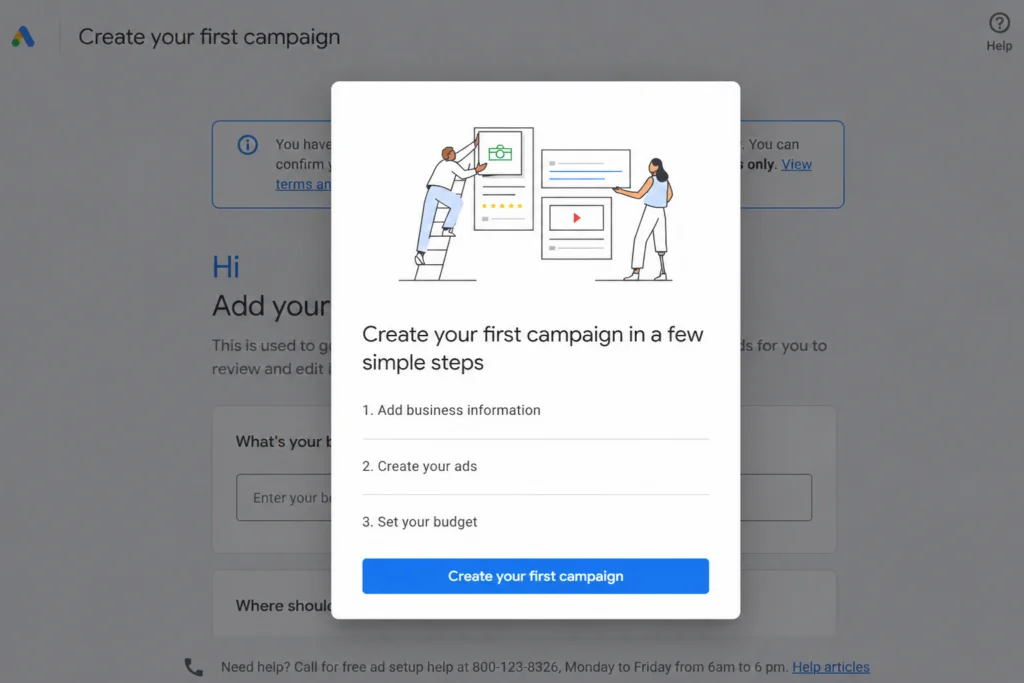
Step 1: Create or Access Your Google Ads Account
If you already use Google Ads, sign in to the account where you want the campaign to run. Existing users can create a campaign from the Campaigns section by selecting the option to start a new campaign.
For a new account, Google will first ask for basic business information and may offer the option to connect existing assets such as your Google Business Profile or YouTube channel. The onboarding process can differ slightly from what an established advertiser sees, so do not worry if the screens do not appear in exactly the same order.
Before moving forward, check that the account belongs to the correct business and that important administrative information is accurate. This is particularly important when several people, agencies, or business locations are involved. Starting with a clean account structure makes permissions, billing, reporting, and future campaign management easier to handle.
Once the account is ready, you can begin creating the campaign.
Step 2: Choose Your Campaign Objective
One of the first decisions Google Ads asks you to make is what you want the campaign to accomplish. Your objective helps Google recommend campaign types and settings that correspond to the outcome you are trying to achieve.
Available objectives depend partly on the campaign type and account setup, but common options include Sales, Leads, Website traffic, and YouTube reach, views, and engagements. Google also provides the option to create certain campaigns without goal guidance when you want more control over the setup.
Choose the objective that represents the actual business result you want rather than the metric that simply sounds easiest to achieve. A company trying to generate qualified inquiries, for example, should usually build the campaign around lead generation rather than selecting website traffic simply because it wants more visitors.
The objective also affects the recommendations Google presents later. If you select Leads, the platform can guide the campaign toward settings designed to generate actions such as form submissions or calls. If the goal is Sales, the setup can instead focus on purchases and conversion value.
This is why the campaign objective should be decided before you start configuring individual settings. It gives the rest of the campaign a clear direction.
Step 3: Choose the Right Google Ads Campaign Type
After defining your objective, choose how and where you want to reach potential customers. The campaign type determines where your ads can appear, which formats you can use, and which targeting and optimization options become available.
Google Ads includes several campaign types, and they serve different purposes:
- Search campaigns use text-based ads to reach people searching for relevant products, services, or information on Google.
- Performance Max campaigns can access Google inventory across Search, YouTube, Display, Discover, Gmail, Maps, and other placements from a single campaign.
- Display campaigns use visual ads across websites, apps, and Google properties.
- Video campaigns help businesses reach audiences through YouTube and other eligible video placements.
- Shopping campaigns are designed to promote products using information from a Merchant Center product feed.
- Demand Gen campaigns use visual formats across surfaces such as YouTube, Discover, and Gmail.
- App campaigns focus on driving app installs, engagement, and other app-related outcomes.
There is no campaign type that is automatically the best choice for every advertiser. The right option depends on what you sell, how customers discover it, the assets you have available, and what you want the campaign to accomplish.
For example, Search can be a practical starting point when people are already looking for a service and you want to capture that existing demand. An ecommerce business with an established product feed may benefit from Shopping or Performance Max, while a company trying to introduce a product visually may have a stronger reason to consider Video, Display, or Demand Gen.
This guide will use Search campaigns for some of the more detailed examples involving keywords and ad groups because those elements are central to Search campaign setup. When the process differs for another campaign type, we will point out the distinction.
If you are still deciding which format fits your advertising goals, Explore our Google Ads services to learn more about how MRKT360 supports paid advertising campaigns.
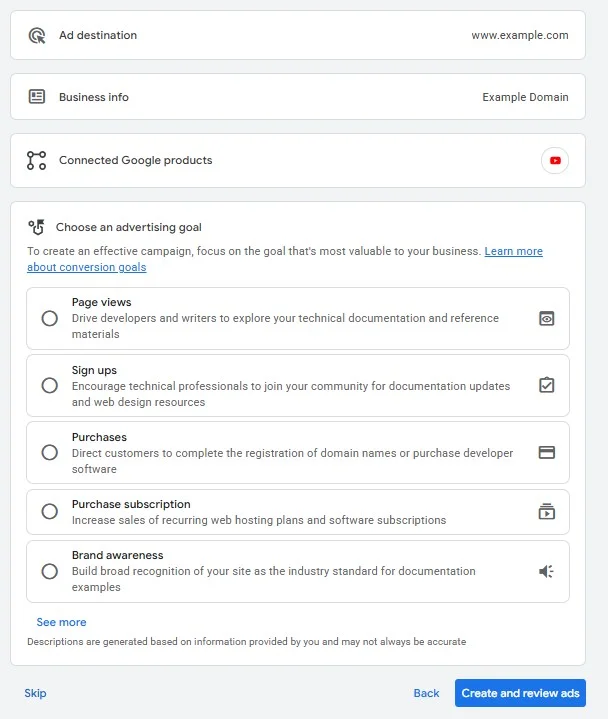
Step 4: Set Up Your Conversion Goals
Before Google Ads can optimize a campaign effectively, it needs to know which actions matter to your business. Conversion goals tell the platform what you want to measure after someone interacts with an ad, such as a purchase, form submission, phone call, sign-up, or other valuable action.
Review the conversion goals associated with the campaign before moving forward. If your account already has conversion actions configured, Google may suggest goals based on your account settings. Make sure the selected actions are relevant to this specific campaign rather than automatically using every available conversion.
This distinction matters because not every tracked action should influence optimization. A purchase or qualified lead may be a primary conversion, while actions such as viewing a particular page can provide useful information without necessarily being the outcome you want Google to prioritize.
If conversion tracking has not been configured yet, set it up before relying on conversion-based bidding or evaluating campaign performance. Depending on your website and measurement setup, conversions can be tracked through the Google tag, Google Analytics, imported data, phone calls, or other supported sources.
Accurate tracking gives you a clearer picture of what happens after the click and helps connect advertising activity to meaningful business outcomes.
Step 5: Define Your Locations and Languages
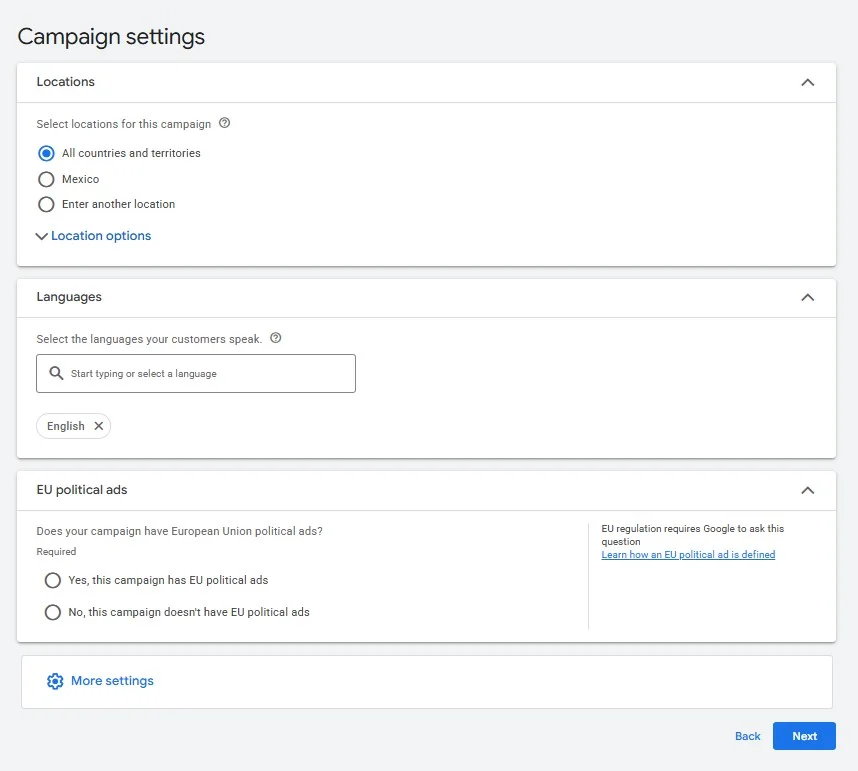
Location targeting determines where Google Ads can show your campaign based on the geographic settings you select. Depending on the business, that could mean targeting an entire country, specific cities or regions, or a more focused service area.
Choose locations based on where you can realistically serve customers rather than simply trying to reach the largest possible audience. A local service business may need a tightly defined geographic area, while an ecommerce company that ships nationwide can use broader targeting.
Pay attention to the location options within the campaign settings as well. Google Ads can use signals related to a person’s presence in or interest in a location, so the appropriate configuration depends on whether you want to reach people physically located in your target market or also people who have shown interest in it.
Language settings work differently from location targeting. Google uses several signals to understand the languages a person knows and may serve ads when it determines that the user understands one of the languages selected for the campaign. For that reason, your language choices should reflect both your audience and the language of the ads and landing pages you are using.
These settings may look simple during setup, but they can significantly affect who enters the campaign. Review them carefully instead of relying on defaults, particularly when your business operates in multiple markets or languages.
Step 6: Set Your Daily Budget
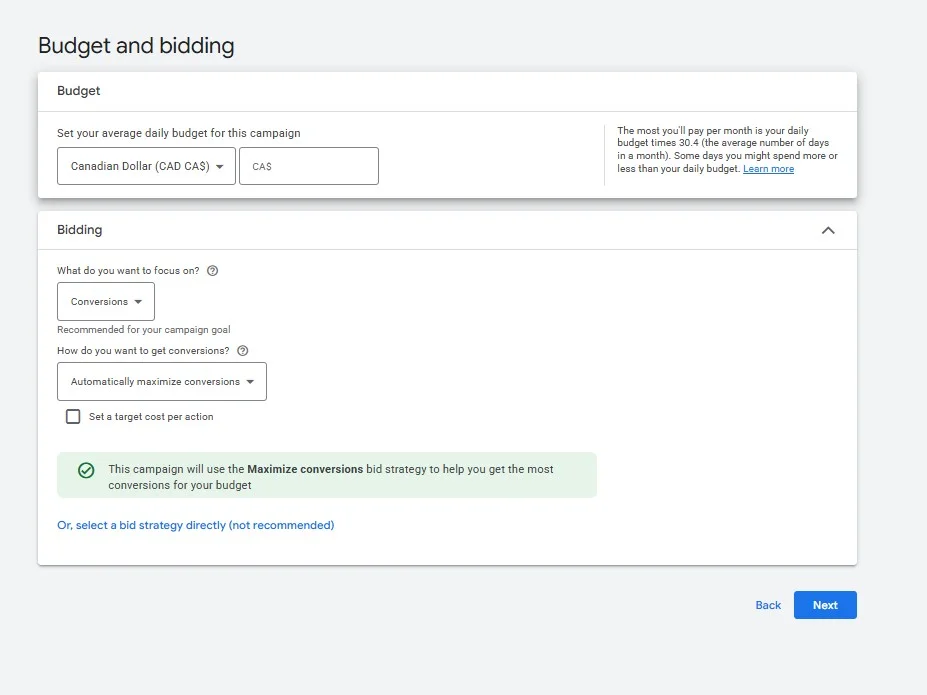
Your campaign budget establishes how much you are prepared to spend and gives Google Ads a framework for ad delivery. In most campaigns, you set an average daily budget rather than entering a fixed amount that must be spent identically every day.
Google may spend more than your average daily budget on days when there are stronger opportunities to generate clicks or conversions and less on other days. Spending is still subject to Google’s applicable daily and monthly charging limits, so it is important to understand how those limits work when planning your overall advertising investment.
Choose a budget that is realistic for the campaign objective, market, and expected cost of reaching your audience. A budget that is too restrictive can limit how often the campaign participates in auctions, while increasing a budget alone will not solve problems caused by weak targeting, poor conversion tracking, or an ineffective offer.
For businesses running several campaigns, budget allocation also becomes a strategic decision. Higher-priority products, services, markets, or campaigns may need different levels of investment based on their goals and performance rather than receiving an equal share automatically.
Start with an amount you can sustain long enough to collect meaningful data. Once the campaign is active, you can evaluate performance and adjust the budget based on actual results instead of treating the initial number as permanent.
Step 7: Choose a Bidding Strategy
Your bidding strategy tells Google Ads how to approach auctions based on the result you want to achieve. The right choice depends primarily on your campaign objective, conversion tracking, and the type of data available in the account.
For campaigns focused on generating conversions, strategies such as Maximize Conversions can automatically adjust bids to pursue as many conversions as possible within the campaign budget. Advertisers with reliable conversion values may instead use Maximize Conversion Value, while optional targets such as a target CPA or target ROAS can add additional performance goals when appropriate.
Campaigns with different objectives may use bidding strategies focused on clicks, visibility, views, or other outcomes. The available options also vary by campaign type, which is another reason to choose the campaign objective and format before deciding how to bid.
Avoid selecting a strategy simply because it promises a specific result. Automated bidding relies on the conversion data, budget, targeting, and other signals available to the campaign. If tracking is incomplete or the campaign is optimizing toward the wrong conversion actions, automation can pursue signals that do not reflect the business outcome you actually care about.
The initial bidding strategy can be adjusted as the campaign collects data and your goals become clearer. What matters during setup is giving Google Ads an optimization target that matches the purpose of the campaign and the measurement system behind it.
Step 8: Configure Your Campaign Targeting and Network Settings
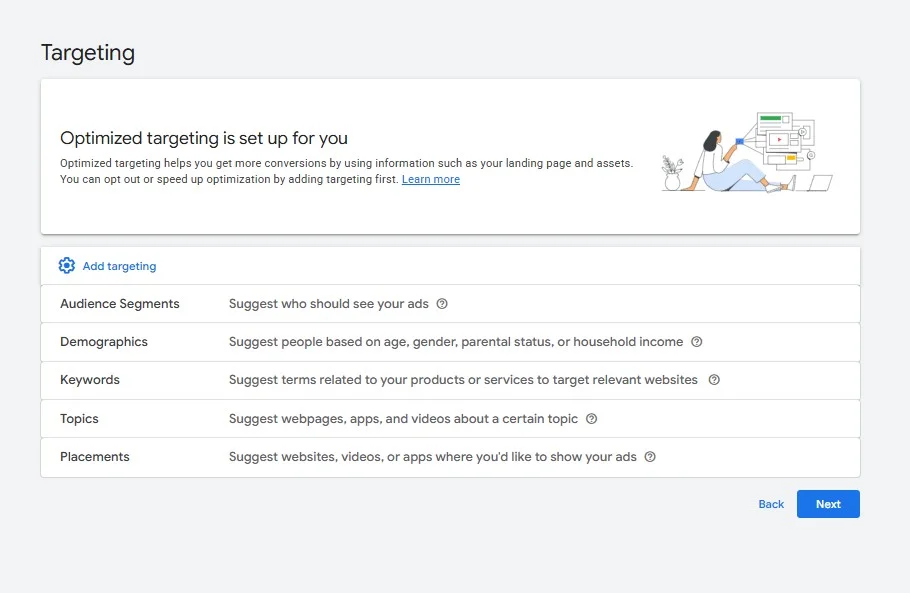
Before building your ads, review the remaining targeting and delivery settings available for your campaign type. These controls determine where your ads are eligible to appear and can have a significant effect on how your budget is used.
For a Search campaign, pay particular attention to network settings. Depending on the options available in your account, Google may allow your campaign to appear beyond Google Search through Search Partners or other eligible inventory. These settings can expand reach, but they should be selected intentionally rather than left unchanged simply because they are enabled during setup.
You may also see audience settings that allow you to add relevant audience segments. In Search campaigns, audiences can be used to gather additional information about how particular groups perform or, depending on the targeting setting, narrow who can see your ads. Before restricting an audience, make sure doing so supports the purpose of the campaign and does not unnecessarily reduce your potential reach.
The exact options will vary across Search, Performance Max, Display, Video, Demand Gen, and other campaign types. Focus on understanding what each setting changes before enabling it. A broader setting can increase reach, while a narrower one can provide more control, but neither approach is automatically better in every situation.
Step 9: Create Your Ad Groups
Ad groups help organize a Search campaign around closely related keywords, ads, products, or services. A clear structure makes it easier to create ads that match what people are searching for and send them to a relevant page on your website.
Instead of placing every keyword into one large ad group, organize them around distinct themes or search intentions. For example, a company offering several services could create separate ad groups for each service rather than combining unrelated searches and directing all of them to the same generic ad.
Keep the relationship between the keyword, ad, and landing page in mind as you build each group. Someone searching for a specific service should ideally see an ad that addresses that need and arrive on a page that continues the same conversation. This creates a more consistent experience from the initial search to the website.
Campaign structure does not need to become unnecessarily complicated. The goal is to create enough separation to keep ads relevant without building so many small groups that managing the account becomes difficult. Start with meaningful themes based on how people search for your products or services, then refine the structure as you collect performance data.
Step 10: Choose Your Keywords and Match Types
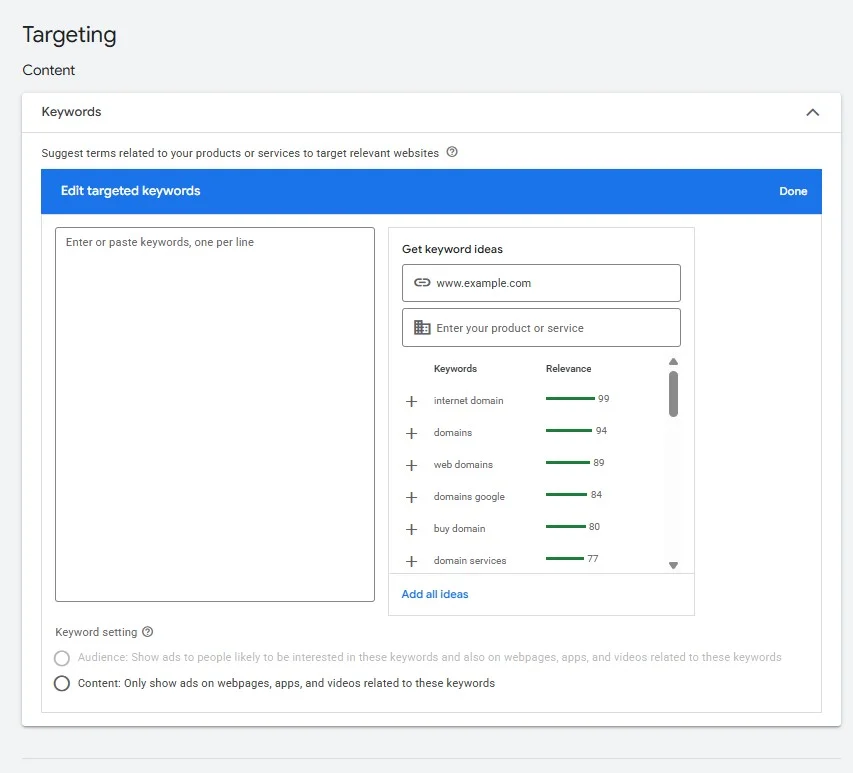
Keywords tell Google which searches may be relevant to your Search campaign. Choosing them requires more than creating a list of terms related to your business. You also need to consider search intent, relevance, competition, and how closely each keyword connects to what you are promoting.
Start with terms a potential customer might realistically use when looking for your product or service. More specific keywords can often reveal clearer intent than broad category terms, but the right mix depends on your market and campaign goals. Keyword research can help you understand how people search and identify terms that deserve further evaluation.
Google Ads currently supports broad match, phrase match, and exact match. These match types influence how closely a user’s search needs to relate to your keyword before the ad becomes eligible to appear.
Broad Match
Broad match provides the widest reach and can match searches related to the meaning of your keyword, including searches that do not contain the exact term. Google can use additional signals to determine relevance, which makes this match type useful for discovering opportunities but also makes careful monitoring important.
Phrase Match
Phrase match gives you more control over the meaning of searches that can trigger your ads while still allowing variations beyond the exact keyword. It can be useful when you want to maintain relevance without limiting the campaign to a very narrow set of queries.
Exact Match
Exact match provides the greatest control over how closely a search must relate to the meaning or intent of your keyword. It does not mean the search must always be identical character for character, as Google can still match close variants and searches with the same intent.
You do not necessarily need to choose only one match type for an entire campaign. The appropriate combination depends on your objectives, available data, bidding strategy, and how much control you need over search traffic.
Once the campaign starts running, review the actual search terms that trigger your ads rather than evaluating keywords only from the original list. Search term data can reveal relevant opportunities as well as queries that do not fit your offer.
Step 11: Add Negative Keywords
Negative keywords help prevent your Search ads from appearing for searches that are not relevant to your campaign. They are an important part of controlling traffic quality and reducing spend on queries that are unlikely to support your goals.
Think about terms that may be related to your keywords but represent a different intent. A business selling premium software, for example, may want to evaluate searches containing words such as “free” if it does not offer a free product. The right negative keywords will depend entirely on the business, offer, and audience.
Avoid building an overly aggressive negative keyword list before the campaign has collected any data. Blocking broad categories without understanding how people actually search can remove valuable traffic along with irrelevant queries. Begin with exclusions that are clearly unsuitable, then use the search terms report to identify additional negatives based on real campaign activity.
Negative keyword management should continue after launch. Search behaviour changes, new queries appear, and broader keyword matching can introduce traffic you did not anticipate during setup. Regular reviews help keep the campaign aligned with the searches that matter to your business.
Step 12: Create Your Google Ads
Once your campaign structure, targeting, and keywords are in place, you can create the ads people will see. For a Search campaign, this generally means building responsive search ads that combine multiple headlines and descriptions to create different ad combinations.
Write each ad around the intent of its ad group. The message should make it immediately clear what you offer and why it is relevant to the search. Include important information such as the service, product, benefit, location, or differentiator when it helps someone understand what they can expect after clicking.
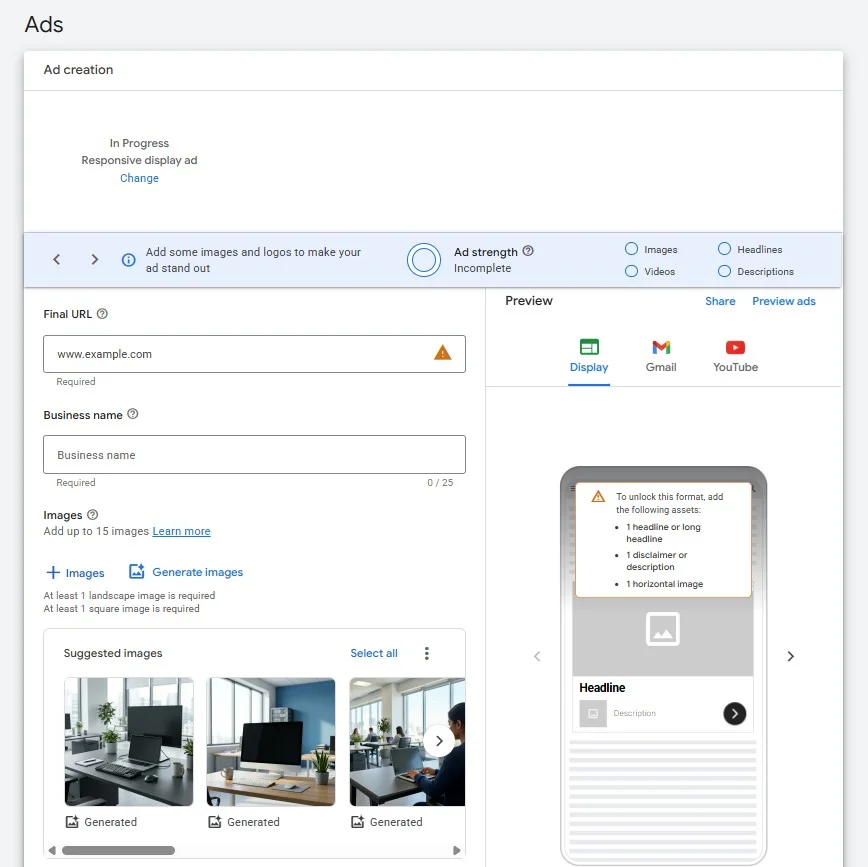
Responsive search ads allow you to provide multiple headlines and descriptions. Google can then test different combinations and learn which ones are more likely to perform for different searches. This makes variety useful, but each asset should still make sense when combined with the others. Avoid filling every available field with minor variations of the same sentence.
Calls to action should also reflect what happens on the landing page. “Request a Quote,” “Book a Consultation,” “Shop Online,” and “Learn More” communicate different expectations. Choose language that matches the next step you actually want the visitor to take rather than using urgency that the offer does not support.
Before moving on, check spelling, claims, prices, promotional details, and final URLs. Your ad is often the first interaction someone has with the business, so clarity and accuracy matter as much as fitting the technical requirements of the platform.
Step 13: Add Relevant Ad Assets
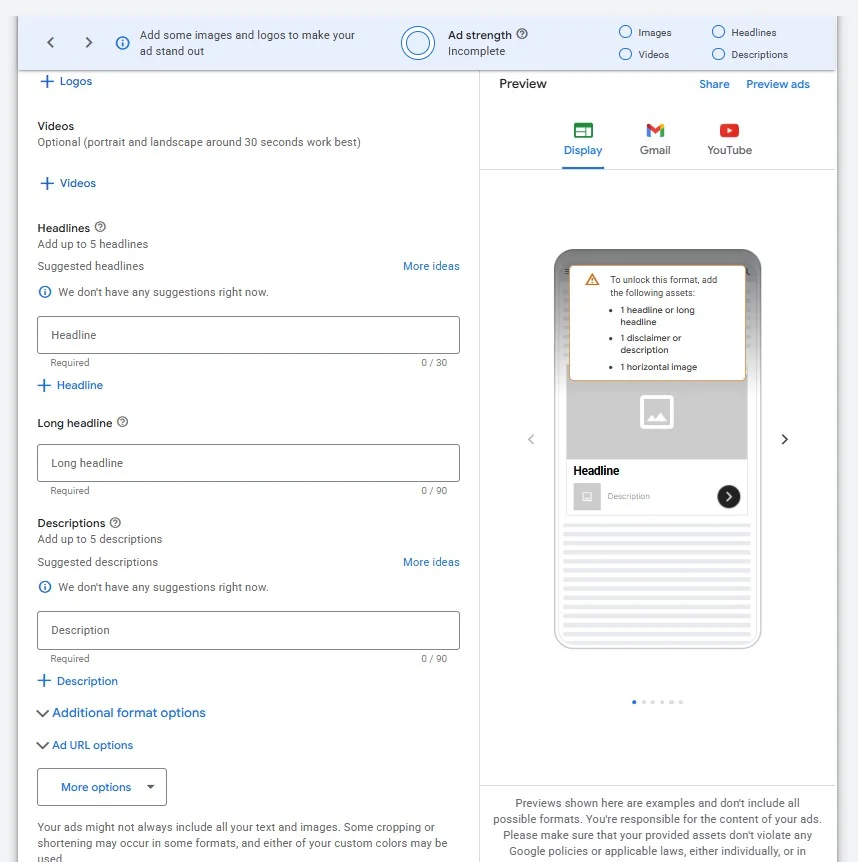
Assets provide additional information alongside your ads and can give people more ways to interact with your business. Depending on the campaign and account, these can include sitelinks, callouts, structured snippets, images, business information, prices, promotions, calls, lead forms, and other eligible formats.
Choose assets based on what would genuinely help someone evaluate the offer. Sitelinks can direct users to useful pages beyond the primary landing page, while callouts can highlight short benefits or features. Structured snippets can provide additional context about categories such as services, types, or destinations when those details are relevant to the business.
Assets should complement the main ad rather than repeat it. If every field communicates the same message, you lose an opportunity to provide additional information. Use the available space to answer likely questions, highlight meaningful differentiators, or give users another relevant path into your website.
Not every asset is appropriate for every campaign. Add the ones that support the offer and keep their information current. Outdated promotions, incorrect phone numbers, or irrelevant sitelinks can create unnecessary friction even when the primary ad is accurate.
Step 14: Review Your Landing Page
The campaign setup does not end with the ad. The page users reach after clicking plays a major role in whether paid traffic turns into leads, sales, bookings, or other valuable actions.
Review the landing page from the perspective of someone arriving from the specific ad you just created. The offer, product, service, or message promised in the ad should be easy to find without forcing visitors to search through the website. If an ad promotes a particular service, sending users to a generic homepage may create an unnecessary extra step.
Check the experience on mobile as well as desktop. Make sure important content loads properly, navigation is usable, forms work, and the primary action is easy to identify. Page speed and technical performance also matter because even a relevant ad can lose potential customers when the destination creates friction.
This is also a good time to test the conversion path yourself. Complete the form, test important buttons, verify phone numbers, and confirm that the expected conversion is recorded correctly. Finding a broken form or tracking issue before launch is much easier than discovering it after the campaign has already spent part of its budget.
Step 15: Review the Campaign Before Publishing
Before publishing, go through the campaign from beginning to end rather than reviewing individual settings in isolation. Google Ads may also flag errors or recommendations during this stage, but your own review should focus on whether the campaign reflects the strategy you intended to build.
Confirm that the campaign is using the correct conversion goals, locations, languages, budget, bidding strategy, and targeting settings. For Search campaigns, review your ad groups, keywords, match types, negative keywords, ads, assets, and final URLs. Small setup errors can affect performance quickly once the campaign begins spending.
Pay particular attention to settings that can expand reach. Location options, networks, audience targeting, keyword matching, and automated features can all influence where and when ads appear. They are not necessarily settings you need to avoid, but you should understand what is enabled before the campaign goes live.
Finally, check that billing information is complete and that there are no account-level issues preventing ads from serving. Once everything matches your intended setup, you can publish the campaign.
Publishing does not mean your ads will appear immediately. Google reviews ads and assets for compliance with its advertising policies, and campaign delivery can also depend on factors such as targeting, bids, budget, approval status, and demand.
What to Do After Your Google Ads Campaign Goes Live
Launching the campaign is the beginning of the optimization process, not the end of it. Once Google Ads starts collecting data, you can begin evaluating whether the campaign is reaching the right audience and generating the actions you intended to measure.
Avoid making major decisions from only a handful of clicks or a very short period of activity. Automated bidding strategies in particular may need time and sufficient data to adjust to the campaign. At the same time, waiting for more data does not mean ignoring obvious problems. Tracking failures, irrelevant searches, broken URLs, disapproved ads, or unexpected spending should be addressed as soon as they appear.
Monitor metrics in the context of your objective. Click-through rate and cost per click can help you understand traffic and engagement, but a lead generation campaign ultimately needs to be evaluated against leads and their quality. An ecommerce campaign may require a closer look at purchases, conversion value, cost per acquisition, and return on ad spend.
For Search campaigns, continue reviewing search terms and adding appropriate negative keywords. You can also evaluate keyword performance, ad combinations, assets, locations, devices, audiences, conversion data, and budget utilization as enough information becomes available.
Optimization should be based on patterns rather than constant reaction. Give meaningful changes enough time to produce useful information, document what you adjust, and use performance data to determine the next step.
Review our Google Ads optimization guide for a closer look at what to monitor and improve once your campaigns begin collecting data.
Common Google Ads Campaign Setup Mistakes to Avoid
Even when every required field is complete, a campaign can launch with settings that make it harder to reach the right audience or understand what is driving results. Many setup problems come from treating each decision separately instead of checking how the campaign objective, targeting, budget, ads, and measurement work together.
One common mistake is optimizing for the wrong conversion actions. If secondary actions are treated as primary goals, Google may optimize toward activity that looks positive in the account but does not represent the outcome the business actually wants. Review conversion settings carefully and make sure the campaign is measuring the actions that matter.
Targeting too broadly can create a similar problem. Locations, audiences, networks, and keywords can expand campaign reach, but more reach does not automatically mean more relevant traffic. Review these settings based on where your customers are, what they are searching for, and what your business can actually provide.
Another mistake is creating a disconnect between keywords, ads, and landing pages. A relevant keyword can still lead to poor results if the ad addresses a different need or sends the visitor to a generic destination. Keeping these elements aligned makes the journey from search to conversion easier to understand and evaluate.
Finally, avoid treating the initial setup as permanent. Search behaviour, competition, costs, campaign data, and business priorities can change over time. A campaign should be monitored and refined after launch rather than left untouched simply because the setup was completed correctly.
How MRKT360 Can Help With Google Ads Campaign Management
Setting up a campaign is only one part of paid advertising. As campaigns begin collecting data, decisions around bidding, targeting, creative, landing pages, conversion tracking, and budget allocation can become increasingly important.
MRKT360 supports businesses with Google Ads campaign strategy, setup, management, and ongoing optimization. Our team can help determine which campaign approach fits your goals, build campaigns around relevant audiences and conversion actions, and use performance data to identify opportunities for improvement.
Paid advertising can also work alongside other parts of a digital strategy. Search visibility, website experience, creative, analytics, and conversion tracking can all influence what happens before and after someone interacts with an ad. Looking at these areas together can provide a clearer view of how paid campaigns contribute to broader marketing goals.
Explore our Google Ads management services to learn more about how MRKT360 can support your paid advertising strategy.
Key Takeaway
A strong Google Ads campaign starts with clear decisions before the first ad goes live. Define the outcome you want, make sure conversion tracking is ready, choose a campaign type that supports that objective, and configure your targeting, budget, and bidding around the audience you want to reach.
From there, build a campaign structure that keeps keywords, ads, and landing pages connected. Review every major setting before publishing, then use real performance data to guide changes after launch instead of relying on assumptions made during the initial setup.
The goal is not simply to complete every field in Google Ads. It is to create a campaign that can be measured, understood, and improved over time.
Ready to Build a Stronger Google Ads Strategy?
Whether you are launching your first campaign or improving an existing account, the right setup can make it easier to understand where your budget is going and which activities are contributing to your business goals.
Talk to the MRKT360 team about your Google Ads strategy and explore how campaign management, optimization, and measurement can work together to support your advertising goals.
FAQs About Setting Up a Google Ads Campaign
How do I create a good Google Ads campaign?
Start with a clear business goal and make sure conversion tracking is configured before launch. Choose a campaign type that matches that goal, define relevant targeting, set a realistic budget and bidding strategy, and keep your keywords, ads, and landing pages closely aligned. Before publishing, review the complete setup to make sure Google Ads is optimizing toward the actions that actually matter to your business.
How much should I budget for a Google Ads campaign?
There is no single daily budget that works for every Google Ads campaign. The appropriate amount depends on factors such as your industry, location, competition, campaign type, goals, and expected cost per click or conversion. Choose a budget you can maintain long enough to collect useful campaign data rather than relying on a universal daily amount.
What do I need before setting up a Google Ads campaign?
At minimum, you should know what you want the campaign to achieve, who you want to reach, where you will send visitors, and how much you are prepared to spend. You should also have conversion tracking in place so you can measure whether people complete important actions after interacting with your ads.
Which Google Ads campaign type should I choose?
The right campaign type depends on your objective and how you want to reach customers. Search can help capture existing search demand, while options such as Performance Max, Shopping, Display, Video, and Demand Gen serve different advertising needs and formats. Consider your audience, available creative assets, products or services, and campaign objective before choosing.